iPhone HEIC Photos and Job Applications: Upload Checklist
By the UtilityNest team · · 7 min read
An application form says "invalid file type" or simply does nothing when you pick a photo from your iPhone. The usual cause is that the photo is a HEIC file, and the form was built to take JPG, PNG or PDF. Most web browsers cannot read HEIC, and HR systems tend to accept a short, fixed list of formats. The fix takes a few minutes, so do it before the deadline.
Work through the checklist below in order. Each item exists because it is a common way an upload from an iPhone fails or reaches the recruiter in poor shape.
1. Read what this form actually accepts
Look for the small print under the upload button, or in the posting's instructions. Accepted formats differ between application systems, and between fields on the same form. Here is what three published help pages say:
| System | Accepted formats | Size limit |
|---|---|---|
| Greenhouse (resumes, cover letters, other attachments) | DOC, DOCX, PDF, RTF, TXT | 100 MB |
| Workable, resume field | PDF, DOC, DOCX, RTF, HTML, ODT | 5 MB |
| Workable, file upload questions | Includes JPG, PNG, GIF, TIFF and PDF, among others | 20 MB |
| USA Staffing (federal application documents) | GIF, JPG, JPEG, PNG, RTF, PDF, DOC, DOCX | Under 5 MB |
None of these pages lists HEIC. Two patterns stand out. First, a resume field often takes documents only, so even a perfect JPG can be refused there. Second, a size limit of a few megabytes is common, and a full-resolution phone photo can be close to it. An employer can also configure its own form more strictly than the vendor's defaults, so the text on your form wins over any general list.
2. Understand why HEIC gets refused
Since iOS 11, iPhones can save photos as HEIF (the files end in .HEIC). Apple says HEIF and HEVC compress better than JPEG and H.264, and the High Efficiency camera setting saves photos that way. The catch is reading it. According to the browser support tables on Can I use, Safari 17 and later can display HEIC, while Chrome, Edge and Firefox cannot. If the recruiter's browser cannot show the image, the system that has to make a preview of it often cannot either, so many forms simply block the extension.
Some forms let a HEIC file through and fail later: the upload "succeeds," but the reviewer sees a broken thumbnail or a download they cannot open. That is worse than an error message, because you never find out.
3. Do not rename .HEIC to .jpg
Changing the extension does not change the file. We renamed our HEIC test file to renamed.jpg and checked it: the file was still identified as a HEIF image with HEVC compression, and a standard image library without HEIF support refused to open it. A form that checks the file's contents will reject it, and one that does not will pass the reviewer a "JPG" that will not open.
4. Get a real JPG, from the phone or after the fact
Change what the camera saves
On the iPhone, open Settings > Camera > Formats and choose Most Compatible. Apple's support page says new photos and videos are then saved as JPEG and H.264. Choose High Efficiency to switch back. This only affects photos you take from now on.
Let sharing convert it, but check the result
Apple says that when you share by AirDrop, Messages or email, the media "might" be sent in a more compatible format such as JPEG, if the receiving device does not support HEIF. "Might" is the important word: emailing a photo to yourself is not a guaranteed conversion. Look at the extension of the file that arrives before you rely on it. Photos shared through iCloud Photos keep their original format.
Convert files you already have
If the HEIC files are already on your computer, our HEIC to JPG converter turns them into JPG (or PNG) in your browser, without uploading them. You can add up to 100 photos at once. The default quality is 92, and an optional Shrink large images switch caps the longest side at 1280, 1920 or 2560 px, or a number you type. In Safari the photo is decoded natively. In Chrome, Edge and Firefox a decoder bundled with the page does the work, which is slower. The converted file keeps the original name with a new extension, and it does not carry over metadata such as GPS location, which is no loss for an application.
5. Check the size after converting
Converting does not solve a size limit by itself. A full-resolution JPG at high quality is a large file, and because HEIF compresses more efficiently, the JPG can come out larger than the photo you started with. Match the settings to the limit on your form.
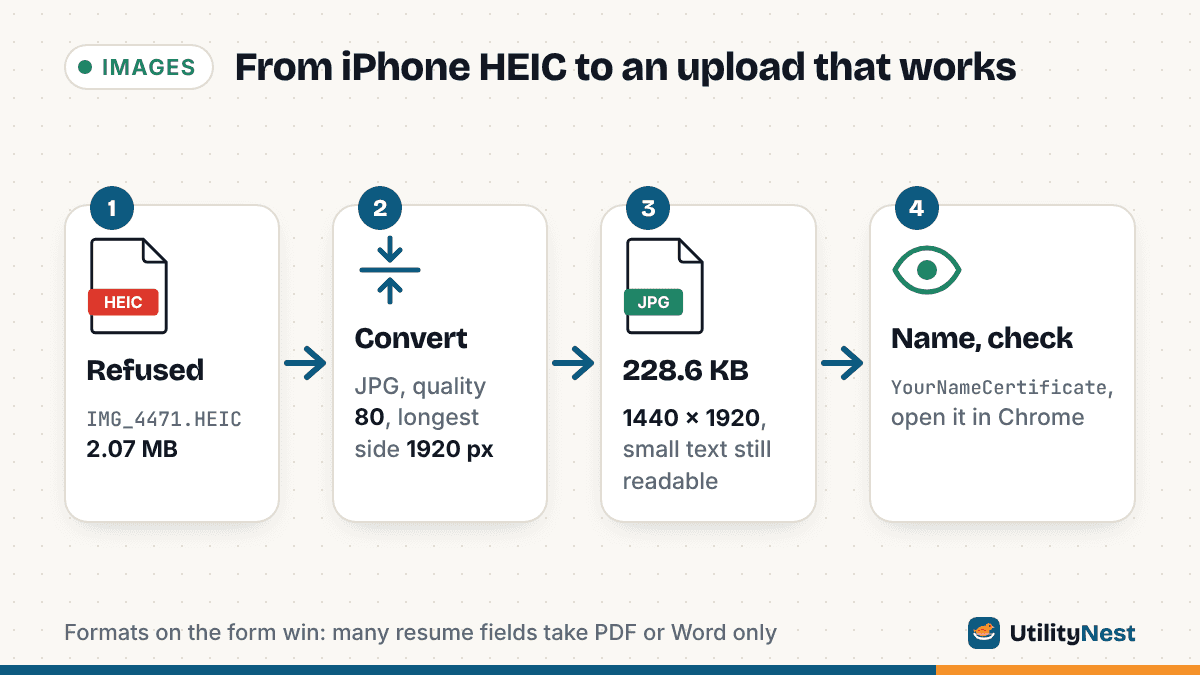
Our test: a 3024 x 4032 HEIC photo of a one-page certificate lying on a desk, 2,175,778 bytes (the tool shows 2.07 MB). We made it with the libheif encoder to match the size of a 12-megapixel iPhone photo; it is not a capture from an iPhone. Converted in Chromium with our HEIC to JPG tool, each run took about 5 to 7 seconds:
- Default (quality 92): 3024 x 4032, 1.55 MB
- Quality 80: 3024 x 4032, 874.3 KB
- Quality 80, longest side 1920: 1440 x 1920, 228.6 KB
- Quality 60, longest side 1280: 960 x 1280, 87.9 KB
The body text on the certificate, about 12 point on the printed page, was still readable at 960 x 1280.
For a 5 MB limit, the default settings are already enough for one photo like this. For forms that combine several pages into one upload, or that have a limit near 1 MB, quality 80 with a longest side of 1920 px is a reasonable place to start. Zoom in on the smallest text after converting. If you can read it comfortably, so can the recruiter.
6. Send documents as documents, not photos of documents
A certificate, transcript or ID photographed on a desk has a background, a tilt, uneven light and sometimes your thumb. It also arrives as an image when many resume and attachment fields, like Greenhouse's, take only document formats. Two better routes:
- Scan it on the phone. In the Notes app, open a note, tap the Attachments button, then Scan Documents. The iPhone detects the page edges (you can adjust the corners) and saves the scan as a PDF in the note.
- Turn existing photos into a PDF. Our Image to PDF tool accepts HEIC directly, so there is no separate conversion step. With our test photo on a US Letter page, the PDF was 1,626,976 bytes with the Original (no quality loss) setting and 219,051 bytes with Smaller PDF (max 2000 px, JPG 75%). It places the photo on the page as it is, so crop out the desk first if you can, and it does not make the text searchable.
If the posting asks for several pages "as one file," put them in a single PDF in the right order rather than uploading the first page and hoping.
7. Give the file a plain name
IMG_4471.jpg tells a recruiter nothing, and some systems are picky about names. USA Staffing's help page asks you to avoid special characters such as parentheses, commas and hyphens, and blank spaces, in both the document name and the file name. A safe pattern works everywhere:
YourNameResume.pdfYourNameFirstAidCertificate.pdfYourNameTranscript2026.pdf
Use letters and numbers only, put your name first, and say what the document is. Avoid names like final_final(2).pdf, which look careless and can trip a strict upload filter.
8. Open the file the way the recruiter will
Before you upload, open the final file on a computer in Chrome or Edge, not only on your iPhone. Your phone can display HEIC, so it hides the problem. Check that:
- The extension is .jpg, .png or .pdf, whichever the form asked for.
- The size is under the limit, with some room to spare.
- The page is upright and all text is readable at 100% zoom.
- Nothing private is visible in the background of a photographed document.
- The file is not password-protected. USA Staffing, for one, does not accept protected files.
After uploading, use the form's preview link if it has one. If the preview shows your document, you are done.
Sources
- Greenhouse Support: Supported formats for resumes, cover letters and other candidate uploads
- Workable Help: supported file types and size limits for candidate resumes and file uploads
- USA Staffing (OPM): Uploading documents to your application
- Apple Support: Using HEIF or HEVC media on Apple devices
- Apple iPhone User Guide: Scan text and documents in Notes
- Can I use: HEIF/HEIC image format browser support
Checked on October 24, 2026. Tested with pillow-heif 1.8.1 (libheif) and Chromium 141.