Why a Black Box Doesn't Redact a PDF (and What Does)
By the UtilityNest team · · 6 min read
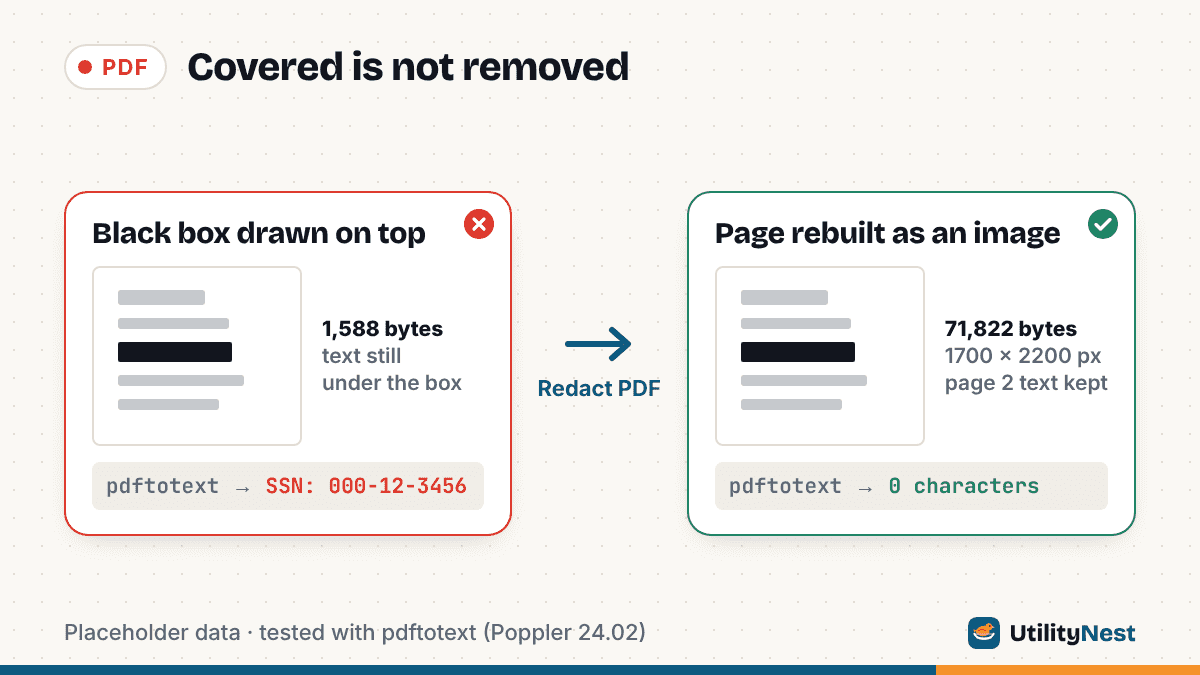
A black box on a PDF page changes what you see. It usually does not change what the file contains. The words under the box are still stored as text, so anyone can copy them, search for them or pull them out with a free tool, and the box itself never comes into it.
We tested this with a two-page claim summary made for the purpose, filled with placeholder data: a name (Jane Example), an SSN line (000-12-3456) and an account number (0000-1111-2222). We covered the SSN line in four common ways, then ran pdftotext (Poppler 24.02) on each file. Then we ran the same original through our own redaction tool and checked the output the same way.
| How the SSN line was covered | File size | Looks covered? | pdftotext output |
|---|---|---|---|
| Nothing (original) | 1,546 B | No | SSN: 000-12-3456 |
| Black rectangle drawn into the page | 1,588 B | Yes | SSN: 000-12-3456 |
| Black rectangle comment (annotation) | 1,751 B | Yes | SSN: 000-12-3456 |
| Black highlight | 1,768 B | Yes | SSN: 000-12-3456 |
| Scan with OCR text, box over the image | 15,679 B | Yes | SSN: 000-12-3456 |
| UtilityNest Redact PDF (default 200 dpi, JPEG) | 71,822 B | Yes | Nothing on page 1 |
All four covered files leaked the full number in one command. Here is why, and what changes when redaction actually works.
A black rectangle hides text only from your eyes
A PDF page is a list of drawing instructions: put these characters here in this font, fill this rectangle there. When you draw a black box, the viewer adds a new instruction that paints over the old one. The text instruction is still in the file. Copy and paste, search and text extraction read those instructions, not the pixels, so they find the SSN as if the box were not there.
It makes no difference whether the box is a shape, a rectangle from the comment tools or a highlight set to black. In our test all three rendered as solid black bars, and all three returned "SSN: 000-12-3456" from pdftotext. A comment-style box is weaker still: it is a separate object on the page, so anyone with an editor that shows comments can select it and delete it.
The NSA's guide "Redacting with Confidence" puts it plainly: covering text with black rectangles or highlighting it in black works for paper but "is not effective, in general, for computer documents," and it calls covering text with black "the most common mistake."
Flattening the box does not delete what is under it
A common follow-up is to flatten the file so the box can no longer be moved. That fixes the box in place, but it does not remove anything. Our "drawn into the page" test file is effectively what flattening produces: the rectangle is part of the page content, not a separate comment. The text under it was still there, and extraction still returned the full line. Flattening makes a cover permanent. It does not make it a redaction.
A scanned page can still carry the text
Scans seem safer because the page is a photo of paper. Two things undo that.
First, many scans have been run through OCR, which adds an invisible text layer on top of the image so the file can be searched. Our scan test had one: the page showed only the picture and our black bar, yet pdftotext returned all three lines, including "SSN: 000-12-3456". The invisible text sits under the box just like ordinary text does.
Second, the box does not cut a hole in the image. It is drawn on top of a complete picture. Running pdfimages on the same file pulled out the original 1275 x 400 px scan with the SSN fully visible. The NSA guide makes the same point about images: covering parts of a picture with separate black rectangles "is generally not effective" for documents shared as files.
The file's properties can repeat what you covered
The page is not the only place information lives. Our test file's document properties held a title of "Claim file - Jane Example", the author "Jane Example", the account number in the subject and the SSN in the keywords. Covering the page changed none of that. pdfinfo printed all four fields from the boxed file. Real files can also carry bookmarks, attachments, form values and comments.
Adobe draws the same line in its Acrobat help: redaction "removes only visible text and graphics," while hidden data such as metadata or embedded content "must be sanitized separately."
Marking something for redaction is not the same as removing it
Real redaction tools work in two steps. In Acrobat Pro, according to Adobe's steps, you choose Redact a PDF, then Redact text and images, drag over the content, and then select Apply; a dialog then offers to sanitize and remove hidden information before you save. Until then, the marks are only an overlay. Adobe notes that redaction "is permanent and cannot be undone once applied and saved," which is also why you should work on a copy.
What our Redact PDF tool does to the file
Our Redact PDF tool does not try to cut text out of a page and leave the rest editable. Every page that has at least one box is rendered to an image in your browser, the boxes are painted into the pixels, and the page is rebuilt from that image alone, with no text, vector content or annotations. Pages without boxes are copied as they are. The file is then written into a fresh PDF so the old page content is not left behind as unused objects. You can draw boxes by hand or use Find and mark to box every match of a phrase.
On our claim summary, we searched for the SSN and the account number (one match each on page 1) and kept the defaults (200 dpi, JPEG). The results:
- Size went from 1,546 B to 71,822 B, because page 1 is now a 1700 x 2200 px image. With the PNG option the same file was 50,695 B; for a page of plain black text, PNG came out smaller here.
- pdftotext returned nothing for page 1. The tool's own check reported 0 characters of text on the redacted page and said neither searched term appears anywhere in the new file.
- Page 2 kept its real text. It was still selectable and pdftotext read it word for word.
- Title, Author, Subject and Keywords were gone. The only properties left were the tool's own Creator and Producer, plus dates.
- Searching every decoded object in the output found no trace of "Jane", the SSN or the account number.
The scan with OCR text went from 15,679 B to 42,564 B. Find and mark located the SSN through the OCR layer, pdftotext returned nothing afterward, and pdfimages found only the new page image, not the original scan with the number under the box.
The trade-offs are real. A redacted page can no longer be searched, selected or copied, including the parts you did not cover, and it is larger than a text page. Bookmarks, document properties, attachments and fillable form logic are not carried over to the new file. Pages you did not box are kept exactly as they were, so text or hidden content on those pages stays. Find and mark only sees pages with a text layer; on a scan without OCR you have to draw the boxes yourself. And the tool removes only what you mark: if a name also appears in a heading or a footer, it stays unless you box it too.
How to check a redacted PDF before you send it
- Open the redacted file, not the original, and press Ctrl+F (Cmd+F on a Mac) for each covered word or number. If search finds it, it is still there.
- Drag-select across a covered area and paste into a plain text editor.
- Run the whole file through a text extractor such as our PDF to Text tool, which reads the text layer as soon as you add the file, and search the result.
- Look at the document properties in your PDF viewer and clear any title, author or subject that names the person.
- Check the pages you did not redact for the same name or number in headers, footers and tables.
Sources
- National Security Agency: Redacting with Confidence: How to Safely Publish Sanitized Reports Converted from Word to PDF (hosted by the Federation of American Scientists)
- Adobe Help: About redacting and sanitizing PDFs in Acrobat Pro
- Adobe Help: Redact sensitive content in Acrobat Pro
Checked on October 24, 2026. Tested with UtilityNest's Redact PDF tool in Chromium, pdftotext, pdfinfo and pdfimages (Poppler 24.02), on test files built with pdf-lib that contain placeholder data only.