remove.bg Is Closing: What to Use Instead
By the UtilityNest team · · 6 min read
remove.bg is shutting down its own website. The notice at the top of every page reads: "remove.bg's background removal is moving to Canva. The standalone website will no longer be available from 1 December 2026 at 9:00am CET." remove.bg's FAQ adds that the service became part of Canva in 2021 and that its background removal is being folded into the Canva platform.
If you use remove.bg now and then to cut a person or a product out of a photo, you have five weeks to pick something else. This guide compares the realistic options on the points that usually decide it: whether you need an account, what resolution you get for free, whether your photo is uploaded, and how many images you can do at once.
What changes on 1 December, and what to check first
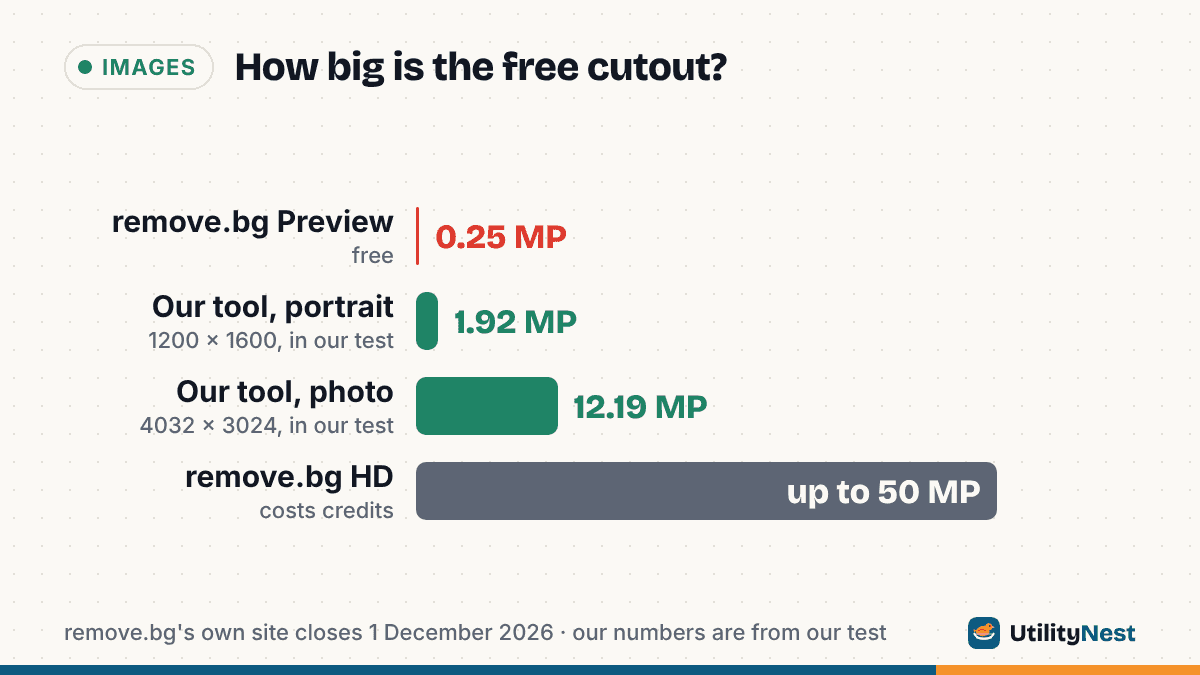
The website at remove.bg stops working at 9:00 CET on 1 December 2026 (that is 3:00 a.m. Eastern). Until then it runs as before. Checked on October 26, 2026, its pricing page lists the free result as a Preview of "up to 0.25 megapixels", while an HD download "up to 50 megapixels" costs credits. The upload limit is 22 MB.
If you have paid for remove.bg, read its FAQ before the date rather than relying on a summary. It has separate entries for annual subscriptions, monthly subscriptions, pay-as-you-go credits, account data after shutdown, the API, the Photoshop plugin and other integrations. Those answers are the only authoritative ones, so we have not paraphrased them here. If you have unused credits, it is worth spending them on any HD cutouts you still need while the site is up.
How the alternatives compare
Most people will choose between four routes: Canva, where remove.bg's feature is going; the tools built into a Mac or an iPhone; or a browser tool that runs the model on your own device, such as ours. Here is how they line up, based on each vendor's own pages and, for our tool, its code and our own test.
| Option | Account | Free output | Photo uploaded? | Several at once | Manual touch-up |
|---|---|---|---|---|---|
| Canva Background Remover | Log in or sign up if prompted | A limited number of free high-resolution downloads | Yes | A separate bulk remover page | Erase and Restore |
| Preview on Mac | No | Full image, converted to PNG | No, it is a local app | One image per click | Smart Lasso for extracting parts |
| iPhone lift subject | No | A copied or shared cutout | No | One subject at a time | No |
| UtilityNest Remove Background | No | Full original resolution, PNG or JPG | No, it runs in your browser | Up to 30 images, ZIP download | Two sliders, no brush |
To put 0.25 megapixels in perspective: that is about 500 x 500 pixels for a square image, or roughly 577 x 433 for a 4:3 photo. That is fine for a thumbnail and too small for a product listing or a print.
Canva: the official successor
Canva's background remover page describes the steps as upload, wait for the background to be removed automatically, then choose Download to save a transparent PNG or Open in editor to keep designing. You may be asked to log in or create a Canva account first. In the editor you can zoom in and use Erase and Restore to fix hair, fur and jewelry, or generate a new background from a text prompt.
On cost, Canva's own FAQ on that page says you can "try the background remover with a limited number of free high-resolution downloads" and that a paid plan unlocks unlimited downloads. It does not give the number, so expect to hit a limit if you process a lot of images. The page also links to a separate bulk background remover for batches.
Canva makes the most sense if you were already taking remove.bg cutouts into a design tool. If all you want is a transparent PNG, the account and the download limit are extra steps.
Preview on a Mac
On current macOS, Apple's Preview guide says to open the image and click the Remove Background button in the toolbar. If Preview asks whether to convert the file to PNG, Apple suggests clicking Cancel and choosing File > Duplicate first if you want to keep the original, or Convert to change the file itself. Edit > Undo reverses the removal.
This is the fastest route for a Mac user with one photo. Nothing leaves the computer and there is no account. The trade-off is control: there is no setting for edge softness or a replacement background, so you would add a color in another app.
Lift subject on an iPhone
On iPhone, Apple's guide says to open a photo in full screen (or pause a video), touch and hold the subject until an outline appears, and then tap Copy, Add Sticker or Share. It works in Photos, Safari, Quick Look and other places.
It is built for pasting a cutout into a message, a note or another app, not for batch work. For a quick sticker or a one-off image in a document it is hard to beat, because it is already on the phone.
A browser tool that does not upload
Our Remove Background tool runs an AI segmentation model (ISNet, an open model) inside your browser. The first time you use it, the browser downloads the model, about 44 MB, and keeps it for next time. After that, your photos are processed on your device: nothing is uploaded, there is no account and no watermark. It uses the graphics card through WebGPU when the browser offers it and falls back to the CPU otherwise.
What it does, according to its code:
- Takes JPG, PNG, WebP or HEIC, up to 30 images in one go, processed one after another.
- Saves at the original pixel size. Transparent backgrounds always save as PNG. With a White, Color or Blur background you can pick PNG or a smaller JPG.
- Has a Compare view with a slider between the original and the result, a Copy image button, and Download all as a ZIP.
- Offers Crop to subject, plus two refine sliders: Edge softness (lower for crisp logos and products, higher for hair) and Keep more / remove more (for faint shadows or leftover background).
In our test on October 26, 2026, a 1200 x 1600 portrait and a 4032 x 3024 photo (about 12.2 megapixels) both came out as full-resolution transparent PNGs, about 21 seconds each on the CPU, including loading the model. We also fixed an issue the same day: the model sometimes scored the inside of solid areas, such as dark clothing, slightly below fully opaque, so they came out a little see-through. Solid subject areas now come out fully opaque.
The limits are worth knowing. There is no brush to erase or restore one spot by hand, so if the model misses a detail, the sliders are all you have. A slow or older device will take longer than our test, and the first run needs that one-time model download.
Full-resolution PNGs with transparency can be large. If a marketplace or form wants a smaller image, run the cutout through Resize Image. Its default output, Same as original, keeps a PNG as a PNG.
Which one to pick
Our suggestions, by situation:
- One photo on a Mac or iPhone: use the built-in feature. It is already there and nothing is uploaded.
- The cutout goes into a design: Canva, since that is where remove.bg's feature is moving and the editor is right there.
- Full-size PNGs, several at once, no account: a browser tool that runs locally, such as ours.
- You used the remove.bg API or a plugin: read the API and plugin entries in remove.bg's FAQ before 1 December, since an app that calls the API needs a replacement before then.
Sources
- remove.bg: Pricing (shutdown notice, Preview and HD resolution, 22 MB limit)
- remove.bg: remove.bg is moving to Canva (FAQ)
- Canva: Online Background Remover
- Apple Support: Remove a background or extract an image in Preview on Mac
- Apple Support: Lift a subject from the photo or video background on iPhone
Checked on October 26, 2026. Tested with UtilityNest's Remove Background tool in Chromium on the CPU.