Why Is My GIF So Big? How to Make a Small GIF From Video
By the UtilityNest team · · 7 min read
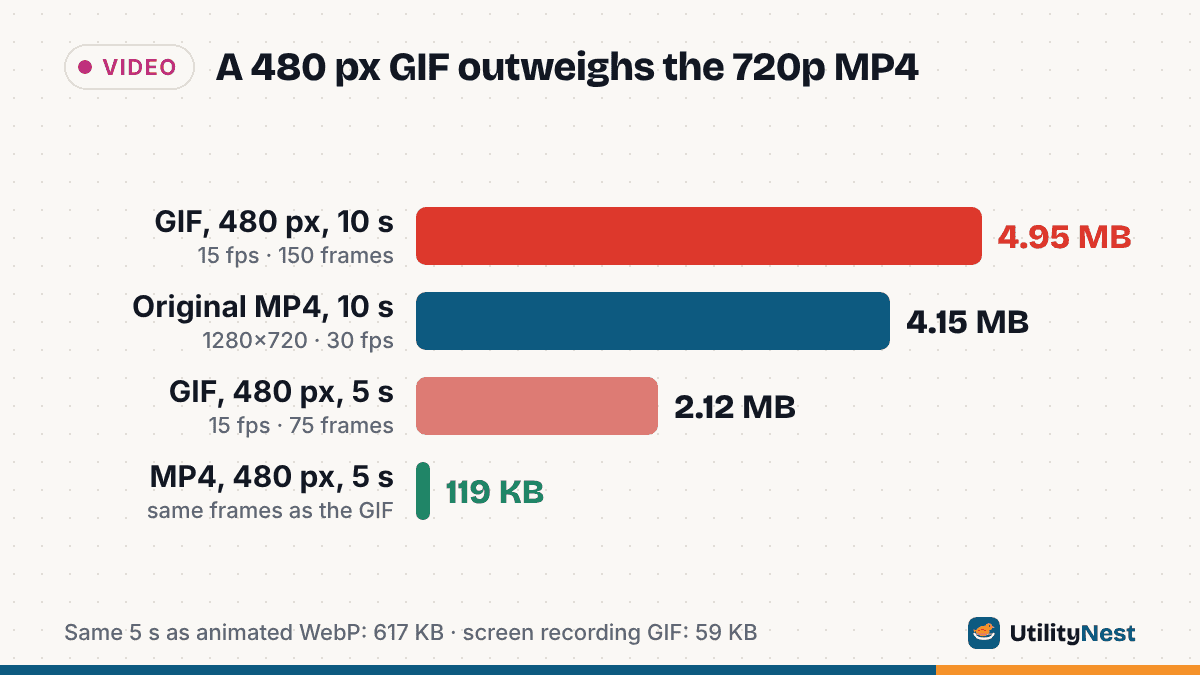
You trim a 10-second phone clip, turn it into a GIF, and the GIF is larger than the video it came from. That is normal, not a mistake in your converter. GIF is a 1987 image format that stores every frame as a picture with at most 256 colors, while MP4 is a video format built to store only what changes. To see how big the gap really is, we made two 10-second 1280×720 test clips and ran them through our Video to GIF tool at nine different settings, then encoded the same five seconds as MP4 and animated WebP for comparison.
The test clips
We generated both clips with FFmpeg 6.1.1, 30 fps, H.264:
- Full-motion clip: a slowly zooming fractal with a little film-like grain, so nearly every pixel changes in every frame, like handheld phone video. The MP4 is 4.15 MB for 10 seconds.
- Screen recording: a flat settings screen with a moving cursor and a counter that ticks up. Most pixels never change. The MP4 is 40 KB for 10 seconds.
The headless test browser could not decode H.264, so for the tool runs we fed it VP9 WebM copies of the same clips. That kept the tool on its browser engine, the path it uses when your browser can decode the video. We counted frames and read frame delays with ImageMagick's identify.
What each setting did to the file size
The tool's controls are a start and end time (the default selection is the first 5 seconds, and GIFs are capped at 30 seconds), width (320, 480, 640 or 800 px, never wider than the video), frame rate (10, 15, 20 or 25 fps) and loop. Sizes below are what the tool reported.
| Clip | Length | Width | FPS | Frames | GIF size |
|---|---|---|---|---|---|
| Full motion | 5 s | 800×450 | 25 | 125 | 7.8 MB |
| Full motion | 5 s | 640×360 | 15 | 75 | 3.7 MB |
| Full motion (default) | 5 s | 480×270 | 15 | 75 | 2.1 MB |
| Full motion | 10 s | 480×270 | 15 | 150 | 5.0 MB |
| Full motion | 3 s | 480×270 | 10 | 30 | 989 KB |
| Full motion | 5 s | 320×180 | 10 | 50 | 836 KB |
| Screen recording | 5 s | 800×450 | 25 | 125 | 169 KB |
| Screen recording | 5 s | 800×450 | 10 | 50 | 86 KB |
| Screen recording (default) | 5 s | 480×270 | 15 | 75 | 59 KB |
Three things stand out. First, a 480-pixel GIF of the full 10-second motion clip (5.0 MB) is bigger than the original 1280×720, 30 fps MP4 (4.15 MB), even though the GIF has about one-seventh of the pixels per frame and half the frames. Second, size follows pixels times frames. Going from 320 px at 10 fps to 800 px at 25 fps multiplies that product by about 16 and the file grew about 9.5 times. Third, content matters more than any setting: the screen recording at the largest settings is still smaller than the motion clip at the smallest.
Why GIF is so much less efficient than MP4
The GIF89a specification stores each frame as a grid of color indexes, compressed with LZW, a lossless method that works well on runs of identical pixels. A color table holds at most 256 entries. That design causes the size problem:
- No real motion prediction. H.264 describes most of a frame as blocks that moved from the previous frame, plus a small correction. GIF can only leave unchanged pixels transparent so the previous frame shows through. Our encoder does exactly that, which is why the screen recording is tiny. When the camera moves, almost nothing is unchanged, so every frame is close to a full new image.
- Lossless compression of noisy pictures. LZW cannot throw away detail you would not notice. Grain, gradients and skin tones turn into irregular pixel patterns that compress poorly.
- Dithering adds noise on purpose. To fake more than 256 colors, encoders scatter pixels of nearby colors. That hides banding but creates exactly the irregular patterns LZW handles worst.
To check the dithering cost separately, we used the FFmpeg command line on the same 5-second, 480 px, 15 fps cut with a palette built from the clip. With no dithering the GIF was 3.0 MB, with ordered (Bayer) dithering 3.3 MB, and with Sierra error diffusion 3.9 MB. Cutting the palette to 64 colors brought it to 2.7 MB. FFmpeg's default without a custom palette was smaller still (1.5 MB) but showed an obvious dot pattern over smooth gradients. Our tool has no dithering or palette switch: it builds one 255-color palette from up to 16 frames sampled across your selection and applies a softened Floyd-Steinberg dither, so the controls you have are length, width and frame rate.
GIF vs MP4 vs WebP for the same 5 seconds
Here is the same first 5 seconds at 480×270 and 15 fps in each format. The MP4 and WebP files were made with the FFmpeg command line (H.264 at CRF 23, animated WebP at quality 75), not with our tools.
| Format | Full-motion clip | Screen recording |
|---|---|---|
| GIF (our tool, default settings) | 2.1 MB | 59 KB |
| Animated WebP (lossy) | 617 KB | 8 KB |
| MP4 (H.264) | 119 KB | 8 KB |
| Original MP4 cut, 1280×720, 30 fps | 1.7 MB | 21 KB |
For the motion clip, the MP4 is about 18 times smaller than the GIF at identical size and frame rate. The full-resolution 720p cut is still smaller than the 480-pixel GIF. Google's web.dev guide on replacing GIFs with video reports the same pattern on its own sample: a 3.7 MB GIF became a 551 KB MP4 and a 341 KB WebM.
How to make a GIF that is small and still looks good
- Cut the length first. Size grows roughly in step with duration. Pick the 2 to 4 seconds that carry the moment. In our test, 3 seconds at 10 fps came in under 1 MB at 480 px.
- Use 480 px or smaller for anything that moves a lot. Halving the width cuts the pixels per frame to a quarter. Keep 640 or 800 px for screen recordings, where small text needs the extra width and the cost is low.
- Use 10 to 15 fps. GIF stores frame timing in hundredths of a second, so 15 fps comes out as alternating 7 and 6 hundredths in our files, and 25 fps as 4. For reactions and UI demos, 10 to 15 fps looks fine; save 25 fps for fast motion that judders.
- Prefer steady shots. A tripod shot or screen capture lets the encoder reuse unchanged pixels. Panning, zooming and grain defeat it.
- Watch the estimate, but trust the result. The tool shows an estimated range before you convert, and its own note says GIF size depends a lot on how much moves. For our screen recording it predicted 819 KB to 3.9 MB and produced 59 KB.
One more thing about the engine: if the browser cannot decode your video, the tool switches to an FFmpeg fallback, and the finished result says which engine it used. In our runs the fallback produced different sizes for the same settings (4.3 MB instead of 2.1 MB for the motion clip, 28 KB instead of 59 KB for the screen recording), so compare results from the same engine.
Size limits where you might post it
GIPHY's creation guide limits uploads to 100 MB and 15 seconds but recommends 8 MB or less, 6 seconds or less, 480p source video, and fewer than 200 frames, with fewer than 100 working even better. Our 800 px, 25 fps motion test (7.8 MB, 125 frames) only just fits that advice. Discord's attachment FAQ says the free upload limit has been 20 MB since August 2026 (up from 10 MB), with 50 MB on Nitro Basic and up to 1 GB on Nitro.
When to skip GIF entirely
If the destination plays video, send video. On your own website, Chrome's Lighthouse guidance and web.dev recommend a <video autoplay loop muted playsinline> element, which behaves like a GIF at a fraction of the bytes. MDN's image format guide notes that GIF supports only 8-bit indexed color and suggests considering WebP, AVIF or APNG for animation. Keep GIF for places that only accept images, such as some forums, email newsletters and older chat tools. If you already have an oversized GIF, our GIF to MP4 tool turned our 2.1 MB test GIF into a 276 KB MP4 with the same 480×270 frame.
Sources
- W3C: GIF89a specification (color tables, LZW, delay time in 1/100 s)
- MDN: Image file type and format guide
- web.dev: Replace animated GIFs with video for faster page loads
- Chrome for Developers: Use video formats for animated content
- GIPHY Support: GIF Creation Best Practices
- Discord Support: File Attachments FAQ
Checked on October 24, 2026. Tested with FFmpeg 6.1.1, ImageMagick 6.9 and headless Chromium (Playwright build 1194).