
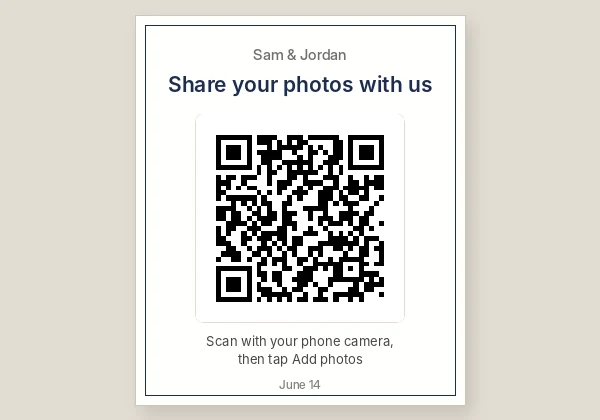
How to use Wedding QR Code
- 1Make the album or form first: a Google Photos shared album with Collaborate on, a Google Form for RSVPs, or your wedding website.
- 2Copy its share link and paste it in the box. A green note confirms it is an album or form link.
- 3Pick colours to match your stationery, or add a small logo or monogram, and wait for Scan test passed.
- 4Download SVG for your designer or printer, or open Print for a sign, a folding table tent or a sticker sheet.
- 5Scan the printed code with a phone that is not yours, ideally one Android and one iPhone, before the big day.
Collecting guests' photos
The most common wedding QR code opens a shared photo album. With a Google Photos shared album, anyone with the link can see the photos without signing in. To add their own, guests sign in with a Google account and tap Add photos, so turn on Collaborate in the album's sharing options before you copy the link. It works on both iPhone and Android, in the app or in a browser.
An iCloud Shared Album with Public Website switched on lets anyone view the photos in a browser, but only people you invite with an Apple Account can add to it. If many of your guests use Android, a Google Photos album is the easier choice for collecting.
Whatever you choose, test it the way a guest would: on a phone signed in to a different account.
RSVP and wedding website codes
For RSVPs, a Google Form is free and gives you a spreadsheet of answers. Paste its forms.gle link here and print the code on your invitation or save-the-date. A wedding website link works too, so guests can find the schedule, travel details and registry.
Keep the link written out next to the code on invitations, for guests who prefer to type it. A short link makes a smaller, cleaner code: in our test a forms.gle link made a 29 x 29 square code that prints from 1.5 cm, and a Google Photos album link a 33 x 33 code from 1.7 cm.
Table cards and signs
Open Print under the code for three layouts. The folding table tent stands on each table, the full-page sign suits an easel at the entrance, and the sticker sheet is for favours, menus or place cards. The headline starts as "Share your photos with us"; type over it in the headline box to say "RSVP here" or anything else.
On a table card, print the code 4 to 6 cm wide so guests can scan from their seats. On a sign at the entrance, make it at least 10 cm. Pale colours look pretty but scan badly in dim reception lighting, so keep the code dark on a light background.
Will it still work after the wedding?
Yes. The code holds your link directly. There is no tracking redirect and no subscription, so it keeps working for as long as the album, form or website does. Guests can keep adding photos for weeks after the day. Just do not delete the album or change its link once the cards are printed.
Frequently asked questions
Do guests need an app to scan it?
No. The normal camera on iPhone and on most Android phones reads QR codes. To add photos to a Google Photos album they sign in with a Google account in the app or a browser.
Is this wedding QR code free?
Yes. No sign-up, no trial and no watermark, and the code never expires.
Can I use my wedding colours?
Yes, as long as the code stays dark on a light background. The scan test under the code tells you if a colour choice makes it hard to read.
What size should the QR code be on a table card?
4 to 6 cm (1.5 to 2.5 in) is comfortable to scan from a seat. The size note under the code gives the smallest safe size.
Can I put two codes on one card, for photos and the website?
Yes. Make each code here, download them, and place both on the card with a clear label above each.