How to use Image Splitter
- 1Choose a JPG, PNG, WebP or BMP image up to 25 MB.
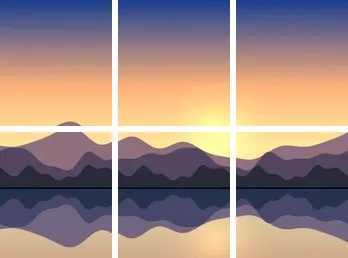
- 2Set the number of columns and rows, up to 10 each. Check where the dashed preview lines cross the image.
- 3Click Download tiles as ZIP to save the whole grid.
- 4Or open Download an individual tile and click the row and column of the piece you want.
What people split images for
The classic use is a grid post: one wide photo cut into three or nine squares that line up as a single picture on a profile page. Others include a carousel made from a panorama, where each slide continues the last one, a long infographic broken into pieces that fit a slide or a chat preview, sprite sheets and game textures cut into equal cells, and jigsaw or classroom activities where each group gets one part of a picture.
Keep the tiles in order
The filenames identify each tile by row and column. For example, r2-c1 is the first tile on the second row. Use one row for a horizontal strip, one column for a vertical strip, or a grid for multiple rows and columns. When you post tiles one by one, start from the last file so the first tile ends up on top.
What happens when the pixels do not divide evenly
In a test with a 401 × 301 PNG, a two-by-two grid produced widths of 200 and 201 pixels and heights of 150 and 151 pixels. A transparent corner pixel remained transparent. The tiles cover the full picture without stretching or trimming away the extra pixels.
What happened when we tested it
We split a 3000 × 2000 JPG of 171 KB into 3 columns and 2 rows. The summary showed 6 PNG tiles, and the ZIP was ready in about a third of a second in headless Chromium. Each of the six files, from landscape-r1-c1.png to landscape-r2-c3.png, measured exactly 1000 × 1000 pixels, and the ZIP came to 1.11 MB.
The ZIP is larger than the original JPG because the tiles are saved as lossless PNG. That keeps every pixel sharp for printing or further editing. If you are posting the pieces online, run them through Compress Image or convert them to JPG first.
Building a swipeable carousel
For a panorama carousel, set rows to 1 and choose as many columns as slides. Each slide should match the shape the app expects, so for square slides your image needs to be exactly as many times wider than tall as you have columns, for example 5400 × 1080 for five slides. Upload the tiles in filename order, r1-c1 first. Because the cuts fall on exact pixel boundaries, the picture continues seamlessly from one slide to the next.
Plan the grid for square posts
For a three-square row, your image should be three times as wide as it is tall, such as 3240 × 1080. For a three-by-three grid, start with a square image. If your picture has a different shape, crop it to the right proportions with Crop Image before splitting, otherwise the tiles will be rectangles rather than squares.
Limits and things it does not do
Images can be up to 25 megapixels and 8,192 pixels on either side. The grid goes up to 10 by 10, and never more columns or rows than the image has pixels. Tiles are always equal parts of the grid; you cannot drag individual cut lines, add gaps between tiles or overlap them. All tiles are saved as PNG. For printing a large picture across sheets of paper with margins and overlaps, use the poster tool instead.
Common problems and fixes
If the image does not open, it may be HEIC or over the size limit; convert it to JPG or resize it with Resize Image. If the posted tiles do not line up on a profile, check that every tile is square and that the app has not cropped the previews. If you only need one piece, the individual tile buttons save time compared with unpacking the whole ZIP.
Frequently asked questions
Does the tool keep transparent areas?
Yes. Tiles are saved as PNGs, which preserve transparent pixels.
Can I make a poster from the tiles?
Use Print Image on Multiple Pages for a PDF with paper sizes, overlaps and trim marks.
Is the image quality reduced?
No. Each tile is a copy of the original pixels in that area, saved without compression loss.
What size is each tile?
The image width divided by the columns and the height divided by the rows. When the division is uneven, some tiles are one pixel wider or taller. Hover over an individual tile button to see its exact size.
Why are my tiles not square?
Tiles take the shape of the image divided by the grid. A 3000 × 2000 image in a 3 by 3 grid gives 1000 × 667 tiles. Crop the image to the right proportions first if you need squares.
Can I split an image into strips?
Yes. Set columns to 1 for horizontal strips stacked top to bottom, or rows to 1 for vertical strips side by side.
Is my image uploaded?
No. The image is split in your browser and the ZIP is created on your device.