Spreadsheets & data
What is a .csv file?
CSV table
A plain-text table for moving data between spreadsheets and apps.
Official sources checked
What it is and where it appears
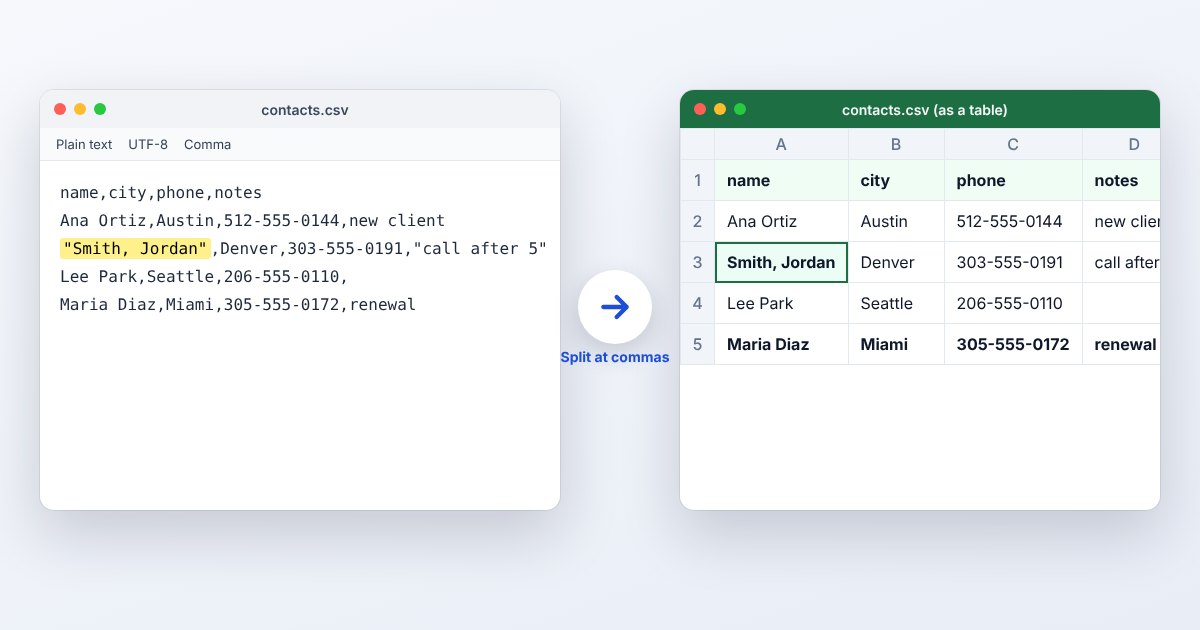
CSV is a text format for a table, commonly produced by bank exports, contact lists, shop reports and research systems. Fields are separated by delimiters, normally commas, and records occupy lines. A quoted field can contain a comma or even a line break without starting another column or record. That is why splitting every line at every comma is not a reliable import method.
Unlike an Excel workbook, a CSV does not describe cell colors, merged cells, charts or multiple worksheets. It also does not reliably tell an importing application whether 00123 is an identifier or a number. The raw characters may be intact while the spreadsheet's automatic interpretation changes what you see. Delimiter, character encoding and column types are therefore part of opening the file correctly.
How to open .csv files
Windows
In Excel, choose Data > From Text/CSV rather than double-clicking a sensitive export. Check the delimiter in the preview and use Transform Data to assign Text to identifier columns before loading. Notepad is useful for inspecting the original characters without spreadsheet number formatting.
Mac
Excel for Mac provides Data > Get Data > From File > From Text/CSV in supported versions. Numbers can also import delimited text. Review the imported preview before editing, especially where a semicolon is used instead of a comma.
iPhone
In Numbers, tap Browse and select the CSV. Select the table, open Format, then Table > Adjust Settings > Delimited to correct the separator. Apple notes that import settings cannot be adjusted after editing the imported table.
Android
Google Sheets for Android can open CSV files. Select the download with Sheets through the file manager or import it into Sheets. Examine long identifiers and dates before making edits; a mobile grid can hide problems that are obvious in the raw text.
Browser
In Google Sheets on the web, use File > Import > Upload and select the CSV. Review separator and conversion settings. UtilityNest's CSV to Excel tool below creates an XLSX copy when your next application expects a workbook.
When to convert it and what changes
Convert to XLSX when the table needs headings, formulas, formats or additional worksheets. That gives subsequent edits a workbook container; it does not restore leading zeros or rounded digits already lost in an earlier spreadsheet save. Re-import the untouched CSV with explicit column types when the source still holds the correct values.
When exporting a workbook back to CSV, choose the required sheet and encoding. Check the actual saved text, not just the open workbook. A receiving system may require exact column names, a particular delimiter and a fixed date convention. Formatting a date prettily in Excel does not establish that the exported characters match the receiving system's specification.
Three common problems and fixes
Excel shows every value in column A
This is a visible import symptom, not a standardized error dialog. Re-import with Data > From Text/CSV and select the actual delimiter. Inspect quote marks if an entire record has been quoted as one field.
An ID changes from 00123 to 123
Excel interpreted it as numeric data. Close without overwriting the source, import again and assign that column the Text type before loading. Adding display zeros afterward cannot reliably reconstruct identifiers of different original lengths.
Names display replacement characters or garbled accents
Choose the encoding used by the exporter during import. For a new exchange file, UTF-8 is a sensible agreed encoding, but selecting UTF-8 cannot repair a file that was already saved with corrupted characters. Request a fresh export if necessary.
.csv and related formats
| Format | Useful for | Main tradeoff |
|---|---|---|
| CSV | Moving one plain table between systems | No workbook formatting or multiple sheets |
| XLSX | Formulas, charts and working spreadsheets | Requires a spreadsheet reader |
| TSV | Tab-separated text exchange | Same need for encoding and type checks |
Frequently asked questions
Does CSV support multiple sheets?
No. Export each required worksheet separately, with filenames that identify the sheet. Use XLSX if the recipient needs one file containing the entire workbook.
Is CSV always comma-separated?
Comma is the conventional separator, but exports and regional settings may produce semicolon-delimited text with the same extension. Inspect the first few records and use the matching import setting.
How do I keep a comma inside a cell?
In conventional CSV, enclose that field in double quotes. A quotation mark inside a quoted field is represented by two quotation marks. Use a CSV exporter so these rules are applied consistently.
Why did a long account number change?
Spreadsheet numeric conversion can lose precision or display scientific notation. Treat account numbers as text at import and compare them with the original export; changing the format after rounding does not bring the lost digits back.