 Instagram


How to use Crop Image
- 1Drop an image or paste one with Ctrl+V.
- 2Choose an aspect ratio, or a social media preset such as Instagram portrait or YouTube thumbnail.
- 3Drag the box or its handles, or draw a new box on the image. Fine-tune with the X, Y, Width and Height fields or the arrow keys.
- 4Optionally turn on Round / circle crop, choose a format, then click Crop and download.
Precise cropping
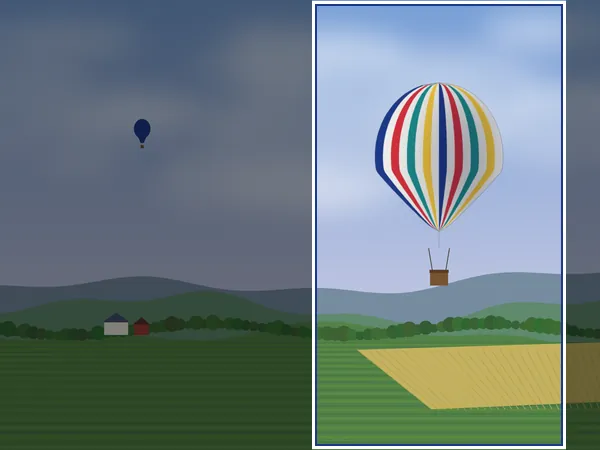
The crop box works with a mouse, trackpad or touch screen. Eight handles resize it while the opposite side stays in place, and a rule-of-thirds grid helps with composition. Arrow keys move the box by 1 pixel, or 10 pixels with Shift. The X, Y, Width and Height fields use the real pixels of your original image, so the result is exact.
Presets and circle crops
Aspect ratios include 1:1, 4:5, 3:2, 2:3, 4:3, 16:9, 9:16 and the original ratio. Choosing a social media preset locks the matching ratio and can also resize the crop to the exact pixel size the platform recommends, such as 1080 x 1350 for Instagram. 4:5 is also the shape of an 8 x 10 inch print (20.32 x 25.4 cm). For a 3.5 x 5 inch print (8.89 x 12.7 cm), unlock the ratio and enter 1050 x 1500 pixels.
Round / circle crop is handy for profile pictures and avatars. Round crops are saved as PNG or WebP so the corners stay transparent.
Quality and privacy
Cropping copies the original pixels without resampling, so quality is kept. If you crop a JPG and save as JPG, it is re-encoded at high quality. The whole process runs in your browser; your photo is not uploaded anywhere.
Check the crop size before using a preset resize
When you pick a social media preset and keep Resize to the preset size on, the cropped area is scaled to the exact preset dimensions. If your crop box is smaller than the preset, that scaling is an enlargement. For example, a 600 px wide crop saved with the 1080 x 1350 Instagram portrait preset is blown up by 80% and looks soft.
Before downloading, glance at the Width field: for a sharp result it should be at least the preset width (1080 for Instagram, 1280 for a YouTube thumbnail). If it is smaller, drag the box larger, use Select largest area, or switch the resize off and keep the crop at its natural size.
What the downloaded file contains
Without a preset resize, the crop is a straight copy of the original pixels, so a 1000 x 1000 crop from a 12-megapixel photo is exactly those 1000 x 1000 pixels. As for the format, JPG stays JPG and is re-saved at quality 92%, GIF and BMP files come out as PNG, and round crops are always PNG or WebP so the corners can be transparent.
The new file is drawn fresh, so camera details and GPS location from the original are not carried over, which makes cropping a quick way to share part of a photo without its location. Phone photos are also shown and saved the right way up, and the result no longer depends on a rotation tag.
Cropping scans and screenshots
For a scanned ID card, receipt or certificate, use Freeform and pull the box tight to the paper edge. Removing the dark scanner lid and empty margins is the cheapest way to make a document file smaller and more readable before you compress it, since every byte then goes to the text. For screenshots, type exact X, Y, Width and Height values when you need several crops of the same region, such as the same panel of an app across a series of screenshots; the fields use real image pixels, so the crops line up exactly.
Round crops are saved with transparent corners
When Round / circle crop is on, the area outside the circle has to be see-through, and JPG cannot store transparency. The tool therefore saves round crops as PNG, or as WebP if you picked WebP. A 1080 x 1080 circle from a phone photo is noticeably heavier as PNG than the same square as JPG, so if a site only accepts JPG or has a small size limit, crop to a plain square instead and let the site apply its own round mask, as most profile picture fields do.
Every download is named after the original with the final pixel size added, for example beach-cropped-1080x1080.png, so you can see the exact dimensions without opening the file.
Frequently asked questions
How do I crop a photo to a square?
Choose 1:1 Square as the aspect ratio, move the box over the area you want, and click Crop and download.
Can I crop to an exact pixel size?
Yes. Type the width and height into the fields, or pick a social media preset and keep Resize to the preset size switched on.
How do I make a circle profile picture?
Pick 1:1 Square, turn on Round / circle crop and download. The image is saved as a PNG with transparent corners.
Does cropping reduce quality?
No. The cropped area keeps the original resolution. Only the area outside the box is removed.
Does it work on phones?
Yes. You can drag the box and handles with your finger.
Why does my cropped Instagram image look blurry?
The crop box was smaller than 1080 px wide and Resize to the preset size enlarged it. Make the box at least as wide as the preset, or turn the resize off.
Does cropping remove the photo's GPS location?
Yes. The cropped file is a new image and does not carry the original EXIF data, including GPS. To keep the whole picture but remove the location, use Remove EXIF instead.
Can I crop several images the same way?
This tool crops one image at a time. Typing the same X, Y, Width and Height values for each image gives identical crops.