Documents
What is a .hwpx file?
Hancom HWPX document
An XML-based Hangul document format used by Hancom Office.
Official sources checked
What it is and where it appears
HWPX is Hancom's XML-based word-processing document format. You may receive it from the same universities, offices and public organizations that distribute HWP forms. It can hold the text and layout information needed to reconstruct a complete Hangul document, with resources such as embedded images. The extra x is significant: this is a different storage format, not a cosmetic filename update.
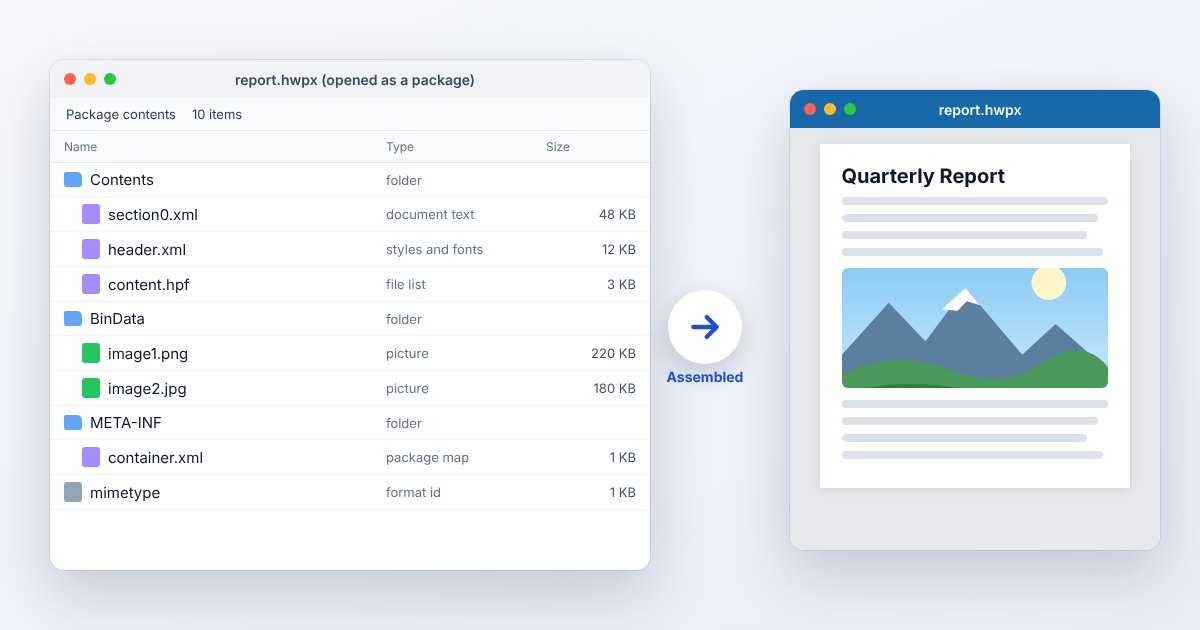
Hancom describes HWPX as an OWPML-based package using XML files inside a ZIP structure. That makes its internal components easier for software to inspect than binary HWP records. It does not make HWPX a Word document, and it does not mean a generic XML viewer can display the finished pages. Relationships, styles and resources must still be interpreted together.
How to open .hwpx files
Windows
Open the file with an updated Hancom Hangul application or supported Hancom Office Viewer. Use File > Open and select the original HWPX. Hancom's compatibility guidance stresses applying viewer updates; an old installation that reads HWP may still need an HWPX-capable update.
Mac
Start with Hancom's official Mac viewer option and verify HWPX in that product's current support list. If the installed edition cannot open it, ask the author for PDF or use UtilityNest's supported browser workflow. A ZIP utility only exposes package contents.
iPhone
Hancom's iOS Office format list includes HWPX. Save the attachment and open it in that app. For a document that must be returned as HWPX, confirm the edited export type before sending it; a preview or PDF copy is a different deliverable.
Android
Check the exact Hancom app and version. Hancom's historical HWPX FAQ specifically identifies an older Android Office Viewer limitation, so do not assume every app carrying the Viewer name supports it. Use a current HWPX-capable Hancom product or the browser workflow.
Browser
Use the linked UtilityNest conversion tool for supported HWPX files and inspect the resulting document. Browsers do not render the XML package as a word-processing document by themselves. If conversion fails on a protected package, open it through the author's compatible Hancom application.
When to convert it and what changes
Convert to HWP when a portal accepts only .hwp or a colleague has an older Hangul workflow. Use an actual Save As or conversion operation that writes HWP. Simply deleting the x leaves ZIP/XML data behind a misleading extension. Compare the new file's tables, page breaks, equations and images with the original before submission.
For a reading copy, PDF avoids requiring the recipient to understand either Hangul source format. DOCX is useful for editing in Word, but features can be represented differently. Although the HWPX package uses XML, exporting its raw text is not the same as preserving the document: layout, embedded objects and relationships are separate parts of the source.
Three common problems and fixes
An older viewer opens HWP but rejects HWPX
Update the viewer or install a version with documented HWPX support. Hancom does not publish one English error string for all these products. If upgrading is impossible, have the sender export HWP or PDF from a compatible editor.
An archive app shows XML files instead of pages
The file has opened as its ZIP package. Close the archive view and open the original .hwpx in a document viewer. Do not delete or rearrange internal XML files in an attempt to make it resemble a PDF.
A submission form accepts .hwp but rejects .hwpx
Use the matching HWPX to HWP conversion or the editor's Save As format selector. Then reopen the converted HWP. A portal's extension filter is separate from the document's readability, so renaming the original can produce a file that uploads but cannot be used.
.hwpx and related formats
| Format | Useful for | Main tradeoff |
|---|---|---|
| HWPX | Structured XML-based Hangul documents | Requires HWPX-aware rendering |
| HWP | Legacy and specified Hangul handoffs | Different binary structure |
| DOCX | Microsoft Word editing | Different XML vocabulary and features |
Frequently asked questions
Is HWPX a ZIP file?
Its package uses ZIP structure, according to Hancom. Unpacking a copy is useful for technical inspection, but the document's readable pages need a renderer that understands the contained XML and resources.
Can I rename HWPX to DOCX?
No. Both may be packaged formats, but they use different document structures. Convert with an application that supports the source and target formats, then review the Word result.
Why did my new document save as HWPX?
Hancom's HWPX guidance describes it as a default format in newer installations. Check the application's save-format preference or choose HWP explicitly when a recipient requires that older format.
Should I keep the original after conversion?
Yes when the form or layout matters. The source lets you compare the converted version and try a different export if a table, equation or embedded image does not survive the first workflow.