Images
What is a .jpg file?
JPEG image
A widely supported photo format for sharing, uploading and printing.
Also seen as .jpeg
Official sources checked
What it is and where it appears
JPG and JPEG are familiar extensions for photographic images using JPEG compression. Camera exports, scanned photographs and web downloads often use them because continuous-tone pictures can be stored efficiently. In ordinary use, .jpg and .jpeg refer to the same format family; the shorter extension does not indicate a smaller image or a lower-quality version.
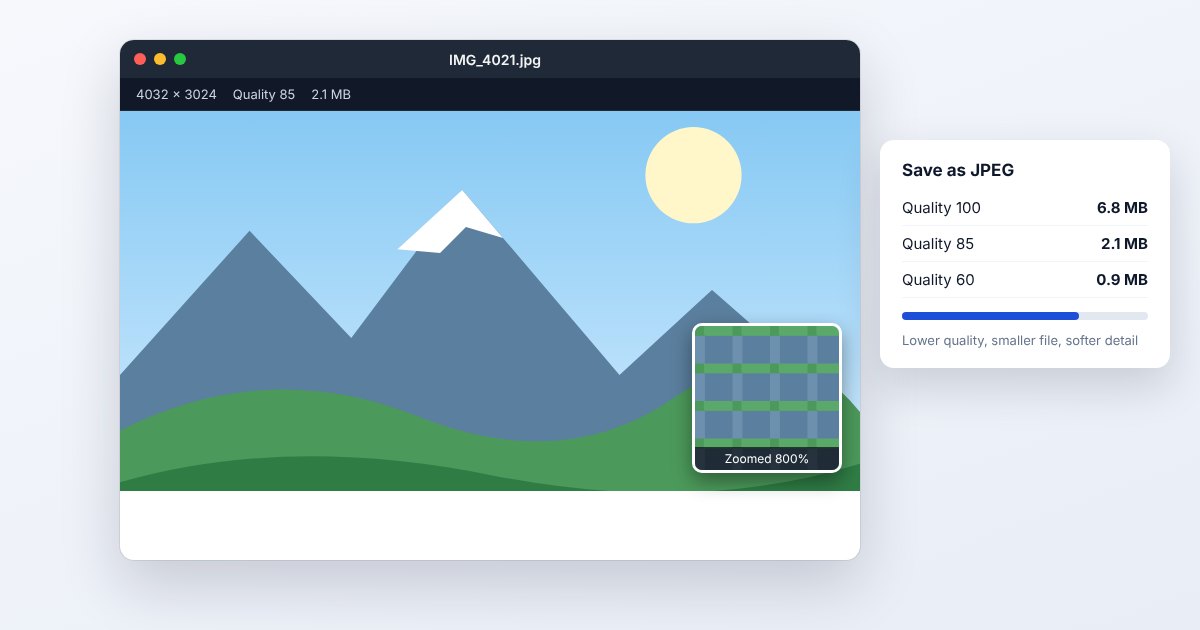
The common JPEG workflow is lossy: an encoder discards some image information to reduce size. Quality settings control that tradeoff. This works well for many photographs, but strong compression can create blocks or ringing around sharp text and edges. A JPEG is usually a flattened delivery image, not the layered source a designer would keep for future revisions.
How to open .jpg files
Windows
Double-click the image to open it in Photos, or right-click and choose Open with > Photos. Paint can handle simple edits. If an application rejects a particular JPEG, verify that the downloaded file is really an image rather than a renamed or incomplete attachment.
Mac
Use Preview and choose File > Open, or open the picture from Finder. Preview's File > Export can produce another image format. Keep the original when resizing or adjusting compression so later edits do not begin from an unnecessarily degraded copy.
iPhone
View camera-library JPEGs in Photos. For an attachment, open it from Files or Preview on an iOS version that includes Preview. A screenshot of the displayed photo is a new image with screen-dependent dimensions, not an original-quality export.
Android
Open the picture in Google Photos or the device's gallery. For a downloaded file, use the file manager's Open with control if it opens in the wrong app. Android documents support for baseline and progressive JPEG decoding.
Browser
Chrome, Edge, Firefox and Safari display ordinary JPEGs directly. On desktop, drag the file into the browser or use its Open File command. A web form can still reject a valid JPEG because of file size, dimensions or its own upload rules.
When to convert it and what changes
Convert to PNG for a lossless working copy of the currently decoded pixels, particularly before adding crisp graphics or text. This does not restore detail lost in the JPEG. Converting back and forth can create larger files without improving the photograph. Keep a camera RAW or other higher-quality original when available.
Export another JPEG when you need a smaller photograph for upload, and reduce dimensions only when the destination permits it. Ordinary JPEG does not preserve transparency or editable layers; choose a background deliberately when flattening a transparent source. Metadata such as capture date, orientation and location can be retained or removed by different exporters, so inspect those separately.
Three common problems and fixes
Photoshop: “unknown or invalid JPEG marker type”
The file may be damaged or its extension may not match its contents. Obtain the original again and verify the real format. If another supported viewer opens it, export a fresh JPEG copy there; changing a random suffix is not image repair.
The photo has blocks or halos around edges
This is a compression artifact rather than a standard error dialog. Re-export from the best available original at higher quality or more suitable dimensions. A higher-quality save of the already damaged JPEG cannot recreate discarded detail.
A transparent logo gains a solid background
JPEG does not support the alpha transparency used by PNG or WebP logos. Return to the transparent source and export PNG, or deliberately flatten it onto the final background. Erasing white pixels afterward can damage light parts of the logo.
.jpg and related formats
| Format | Useful for | Main tradeoff |
|---|---|---|
| JPG/JPEG | Opaque continuous-tone photographs | Lossy; no ordinary transparency |
| PNG | Screenshots and transparent graphics | Often larger for photographs |
| HEIC | Efficient camera originals | Less universal attachment support |
Frequently asked questions
Is JPEG better quality than JPG?
The spelling does not determine quality. Dimensions, source material and encoding settings do. Renaming .jpeg to .jpg does not recompress the photo because the underlying format is the same.
Does opening a JPEG reduce quality?
Viewing or copying the file does not itself re-encode it. Quality changes when an operation writes a new lossy image, such as saving an edited version with JPEG compression.
Why did converting to PNG make the file larger?
PNG preserves the decoded pixels losslessly, including existing compression artifacts. It can require more space for a photograph without adding any new visual information.
Can I make a transparent JPG?
Ordinary JPEG has no alpha channel. Use PNG or another alpha-capable format for transparency, or choose an opaque background that matches where the image will appear.