Video
What is a .mp4 file?
MP4 video
A common video container for sharing clips, uploading and web playback.
Official sources checked
What it is and where it appears
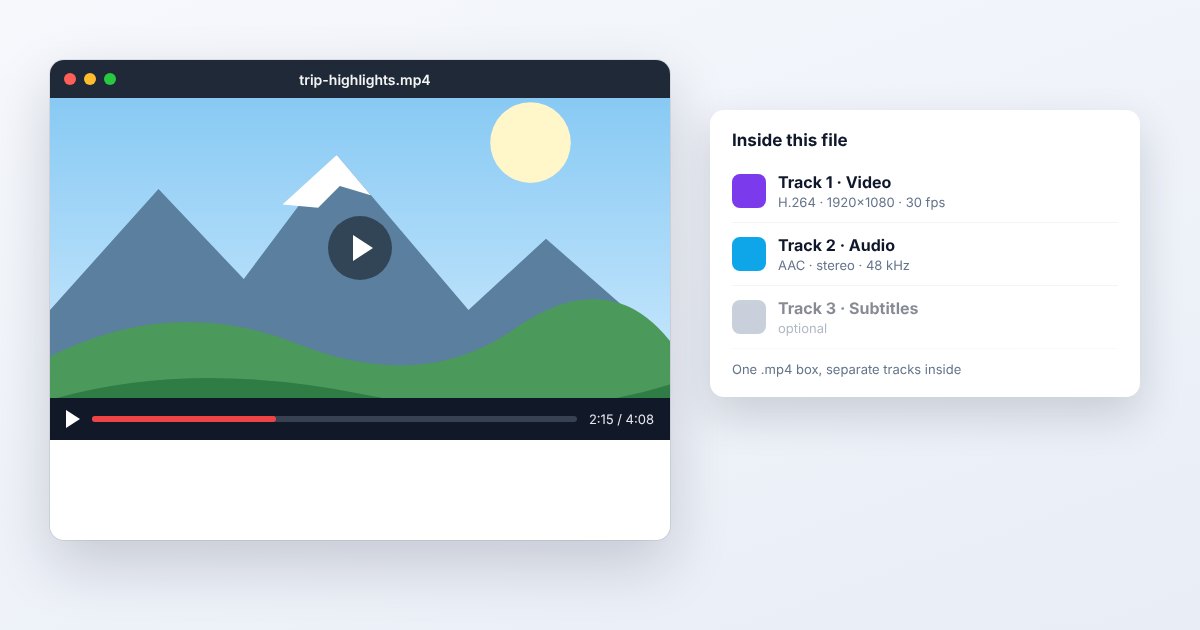
MP4 is a media container used for recordings, downloaded videos and website delivery. It can hold encoded video, audio and other tracks with timing information. The extension is familiar because many devices and platforms support common MP4 combinations, but it is not a guarantee that every MP4 will play everywhere. The codecs, profiles and media characteristics inside the container still matter.
H.264 video with AAC audio is a common compatibility-oriented combination, while other MP4s may use HEVC, AV1 or different audio encodings. A video editor, phone and browser can support different subsets. When troubleshooting, identify the internal streams and the intended destination rather than repeatedly exporting files that all end in .mp4 but use the same unsupported codec.
How to open .mp4 files
Windows
Open the file in Media Player or VLC. If playback fails, inspect the video's codec information and check the player's supported codecs. A file that plays in VLC but not another app may expose a decoder difference rather than a defective download.
Mac
QuickTime Player opens supported MP4 media. Choose File > Open File and use Window > Show Movie Inspector for details. For an unsupported codec, obtain a compatible export or use a player that documents support for that particular stream.
iPhone
Use Photos for supported library videos or open a saved attachment through Files. If a shared clip cannot play, ask for an MP4 using a compatible video/audio combination. Being able to download the file does not mean the device can decode all its tracks.
Android
Open it in Google Photos, the device video player or VLC. Google's Android media table describes codec-specific support and limits; unusually high resolution, profile or bit depth can matter even when another MP4 works on the same phone.
Browser
Try the actual file in Chrome, Edge, Firefox or Safari. Browser and operating-system codecs influence playback. For website delivery, configure the correct content type and test seeking and audio as well as the first frame; a thumbnail alone is not a playback test.
When to convert it and what changes
Re-encode an MP4 when you need a different codec, lower bitrate, smaller dimensions or another frame rate. Those choices can change quality and motion. If only the container needs changing and the streams are supported by the destination, streamcopy or remuxing can avoid another lossy encode. A successful remux does not make an unsupported codec newly compatible.
Extract MP3 when only the audio is needed, recognizing that MP3 creation is normally another lossy audio encode and discards the video. GIF export creates a silent animation with a more limited color model. For any delivery copy, verify duration, orientation, sound, captions and important metadata, then keep the original recording for future edits.
Three common problems and fixes
The MP4 plays sound but has a black picture
Video and audio are decoded separately. Check the video codec, profile and device support, then use an appropriate decoder or compatible re-encode. Do not convert only the audio track when the missing component is the picture.
The video plays but no sound is heard
Check the selected audio track and mute controls first. Inspect whether the source contains audio and whether the player supports its codec. When converting, select the intended audio stream; not every workflow copies all tracks automatically.
A video plays locally but will not start on the website
Check the web response, codec support and file organization. MP4 metadata may need to be placed before media data for progressive playback. A web-ready remux can help with that layout issue, but missing or damaged recording data needs a new source.
.mp4 and related formats
| Format | Useful for | Main tradeoff |
|---|---|---|
| MP4 | Common video delivery | Container alone does not guarantee decoding |
| MOV | Apple and production interchange | Often needs compatibility checking |
| GIF | Short silent looping images | No normal audio; restricted color palettes |
Frequently asked questions
Is MP4 the same thing as H.264?
No. MP4 is a container; H.264 is a video codec that can be stored inside it. Other codecs can also appear in MP4, which is why checking the extension is insufficient.
Can an MP4 contain only audio?
The container can carry media tracks without requiring a video track in every file. Audio-only MPEG-4 files often use .m4a, but the extension alone is not a complete inventory of their streams.
Does converting MP4 to MP4 reduce quality?
Re-encoding can introduce additional loss, depending on settings. Copying already encoded streams into a new container avoids that encode step but cannot perform changes such as resizing or burning in captions.
Why did compression make the MP4 larger?
The new bitrate, codec or audio settings may be less efficient than the source. Compare actual duration and file size, and choose target settings appropriate for the content rather than assuming a conversion always compresses it.