Captions
What is a .srt file?
SubRip subtitles
A plain-text subtitle file with numbered captions and start and end times.
Official sources checked
What it is and where it appears
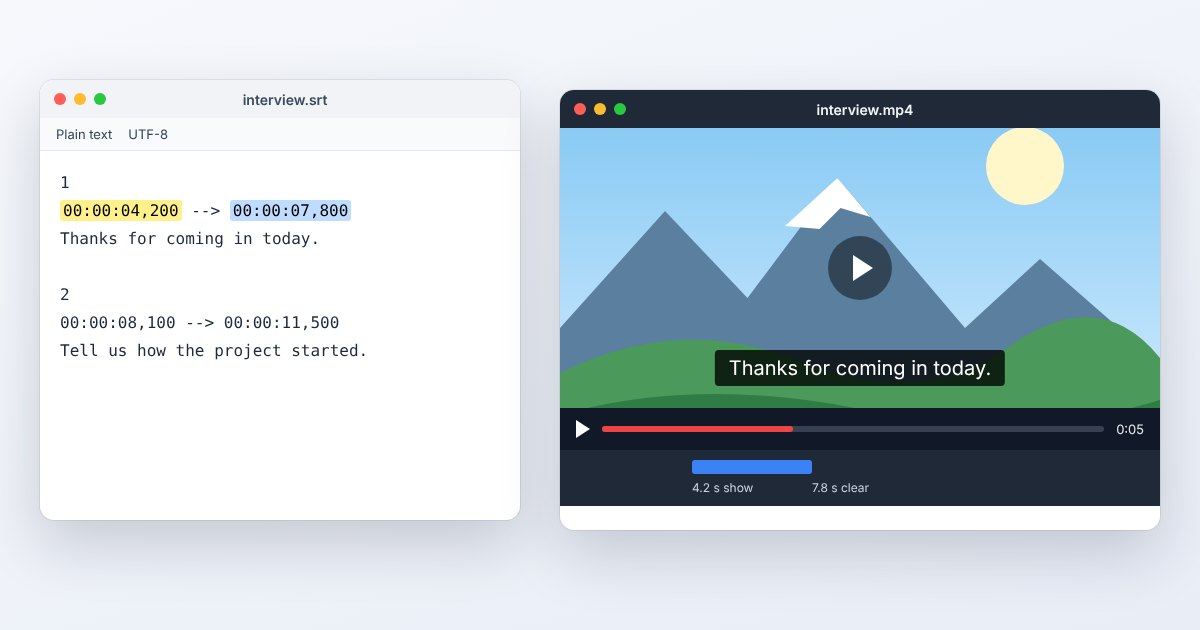
SRT is a plain-text subtitle file associated with SubRip. It stores caption text and the times at which that text should appear over a video. You may receive it beside a downloaded recording, from a transcription service or from a translator. The SRT does not contain the video or its sound; it needs to be paired with the correct media file.
A typical cue contains a number, a start and end time separated by an arrow, the caption text and a blank line before the next cue. SRT timestamps commonly use a comma before milliseconds, such as 00:00:02,500. Applications differ in the extra styling they accept, so a simple UTF-8 file with correct timing is a safer exchange copy than one dependent on elaborate formatting.
How to open .srt files
Windows
Notepad can inspect the text. For playback, open the video in VLC, use Subtitle > Add Subtitle File and choose the SRT. Select the appropriate subtitle track if more than one is available. Opening only the SRT will not play the movie.
Mac
Use a plain-text editor to inspect cues, taking care not to save rich-text formatting. VLC on Mac can associate external subtitles with a video through its subtitle controls. Check the beginning and end against the exact media version you will distribute.
iPhone
VLC for iOS supports subtitle tracks and file transfer from local or cloud storage. Bring the video and subtitle into the app's accessible storage, then use its subtitle-track controls during playback. Safari does not attach an arbitrary SRT to a video just because both were downloaded.
Android
In VLC for Android, open the video, open the subtitles pane, tap its Options control and choose Select subtitle file. Navigate to the SRT and select it. That chooses a playback track; it does not permanently burn the words into the video.
Browser
Use UtilityNest's subtitle converter to inspect or convert the text. For YouTube, use YouTube Studio > Subtitles, select the video and upload a supported caption file. A standard HTML video track normally expects WebVTT rather than raw SRT.
When to convert it and what changes
Convert to VTT when publishing a native caption track on a website. A proper conversion changes the header and timestamp syntax while preserving the intended cue text and times. Check the first cue, a cue after any edited section and the last cue; a filename change alone cannot make the text valid WebVTT.
Burn captions into a video only when you need them always visible in the picture. This makes them part of the frames, requires video rendering and prevents viewers from turning them off or selecting another language. For accessible, selectable captions, retain a separate text track. Styling can be lost between formats or ignored by the receiving platform even when timing survives.
Three common problems and fixes
VLC: “failed to convert subtitle encoding”
The player may be interpreting the wrong character encoding. In VLC for Windows, inspect Tools > Preferences > Subtitles/OSD > Default encoding, then save and restart as documented. Prefer a correctly exported UTF-8 source when exchanging captions.
Every caption is late by the same amount
Check a constant offset using VLC's Tools > Track Synchronization. If an offset solves playback, apply the correction in the subtitle editing workflow before distribution; a player's temporary synchronization setting is not the same as saving corrected cue times.
Captions drift farther out of sync as playback continues
The subtitle and video may come from different edits or timing bases. Compare corresponding spoken lines near the beginning and end. Obtain the matching subtitle version or retime the cues; a single constant delay cannot fix growing drift.
.srt and related formats
| Format | Useful for | Main tradeoff |
|---|---|---|
| SRT | Simple subtitle exchange | Styling support varies by player |
| VTT | Native web caption tracks | Different header, syntax and settings |
| Burned-in text | Captions visible in every frame | Not switchable or independently editable |
Frequently asked questions
Can an SRT play by itself?
It contains text and timestamps, not audiovisual media. Open it in a text editor for inspection or load it as a subtitle track while the matching video is playing.
Does YouTube accept SRT?
Yes. Google's supported-format page specifies basic SubRip files in plain UTF-8 and says styling markup is not recognized. Check the uploaded captions in the video preview before publishing.
Can I rename TXT to SRT?
Only if the text already follows SRT cue syntax. A transcript without timestamps remains a transcript; it must be timed and structured before a player can use it as captions.
Why do subtitles vanish after converting the video?
An external SRT is a separate file and is not automatically included in a video conversion. Deliver the subtitle alongside the video, embed a supported track deliberately, or burn it into a copy when appropriate.