Archives
What is a .rar file?
RAR archive
A compressed file package that is often distributed in numbered parts.
Official sources checked
What it is and where it appears
RAR is the archive format produced by WinRAR and RAR. It bundles files and directory information with compression, and it can also use encryption. Receiving a RAR usually means someone has packaged a collection for transfer: you extract the package before using the documents, pictures or software inside. A RAR is not itself a movie, even if the download contains one.
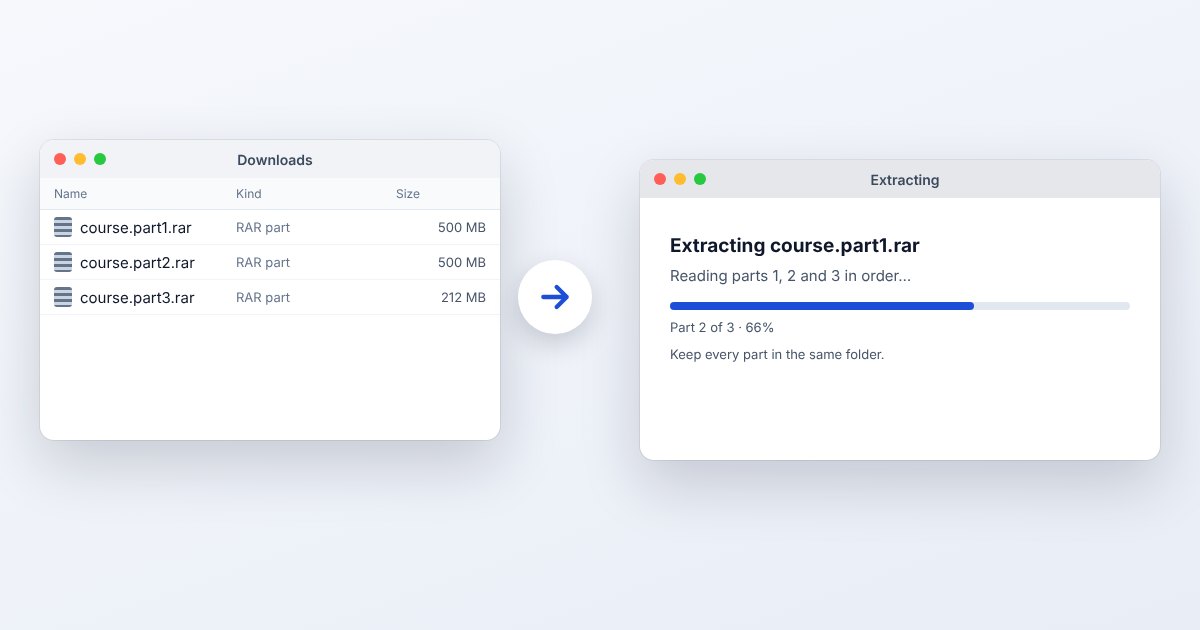
One distinctive feature is multivolume delivery. Names such as project.part1.rar and project.part2.rar describe pieces of the same archive, not alternative downloads. RAR can also include recovery records or have accompanying recovery volumes. These can help with certain damage, but their existence and usefulness depend on how the sender made the archive.
How to open .rar files
Windows
Open the first volume in WinRAR, select the required contents and press Extract To. Choose a destination and confirm with OK. File Explorer on Windows 11 version 24H2 can handle unencrypted RAR, while encrypted archives require an appropriate separate application.
Mac
RARLAB supplies RAR for macOS as command-line software. With the publisher's executable installed, use rar x archive.rar in Terminal to extract with directory paths. Do not look for a Mac version of the Windows WinRAR window.
iPhone
For a single small archive, use UtilityNest's Extract RAR page in Safari and select it from Files. If the archive is encrypted or supplied in volumes and extraction fails, move the complete set to a desktop extractor.
Android
RARLAB publishes RAR for Android. Open the archive in that app and use its extraction control. Keep all numbered files in the same folder when working with volumes. Files by Google's ZIP extraction feature does not cover RAR.
Browser
The matching browser tool below is useful for ordinary RAR downloads. It needs the archive bytes, not a shortcut to a cloud file. Download the original first; use WinRAR or RAR for a complicated volume set rather than uploading each part independently.
When to convert it and what changes
Choose ZIP for a handoff to someone whose device already handles ZIP. Extract all RAR volumes into a folder, check the output, and create a ZIP from the recovered files. The internal documents retain their contents; RAR recovery data, solid-compression settings and the archive password are not carried over automatically.
If you only need one PDF from the archive, extract that PDF instead of changing the entire package. For backups, inspect the folder hierarchy and any important timestamps after extraction. Repacking a damaged RAR does not make the missing data valid: solve the extraction failure before distributing a replacement archive.
Three common problems and fixes
WinRAR: “CRC Failed”
The extracted data failed its integrity check. Obtain a fresh copy or try WinRAR's repair facility if the archive includes suitable recovery information. Verify the repaired output; successful creation of a repaired archive is not proof that every file was recovered.
WinRAR: “Packed Data CRC Failed”
This identifies damage in a volume's packed data and may help locate the particular part to replace. Keep the original numbering, redownload the indicated volume and test the set again from the first volume.
WinRAR: “Unexpected end of archive”
The available file stops earlier than expected. Check the download finished and that all required volumes are present. Compare the affected part with the sender's copy rather than repeatedly trying to extract an incomplete transfer.
.rar and related formats
| Format | Useful for | Main tradeoff |
|---|---|---|
| RAR | Multipart delivery and recovery options | Requires RAR-aware extraction |
| ZIP | Routine folder sharing | No automatic RAR recovery preservation |
| 7z | Solid compression and AES encryption | Different archive structure |
Frequently asked questions
Do I need every RAR part?
Normally yes for a complete extraction. Store the full set together, then begin with the first volume. A later volume is not a self-contained replacement for the first.
Can I recover a forgotten RAR password?
The publisher does not provide a master password. Ask the creator for the correct password or an accessible copy; a conversion tool cannot simply remove unknown encryption.
Does converting RAR to ZIP reduce image quality?
Repacking is lossless when it copies successfully extracted files unchanged. Image quality changes only if you separately re-encode the images, not because their archive wrapper changes.
Why is the last RAR part smaller?
Volumes are cut to the creator's chosen size. The final volume contains the remaining data and can legitimately be shorter; a small last part alone does not demonstrate corruption.