Captions
What is a .vtt file?
WebVTT captions
A browser-friendly text format for timed captions and subtitles.
Official sources checked
What it is and where it appears
VTT, or WebVTT, is a timed-text format designed for web media. It commonly accompanies a website video, a meeting export or a captioning workflow. Its text cues specify when captions appear, and the format can also represent chapters or other time-aligned information. A VTT is a companion resource, not a compressed movie or an audio recording.
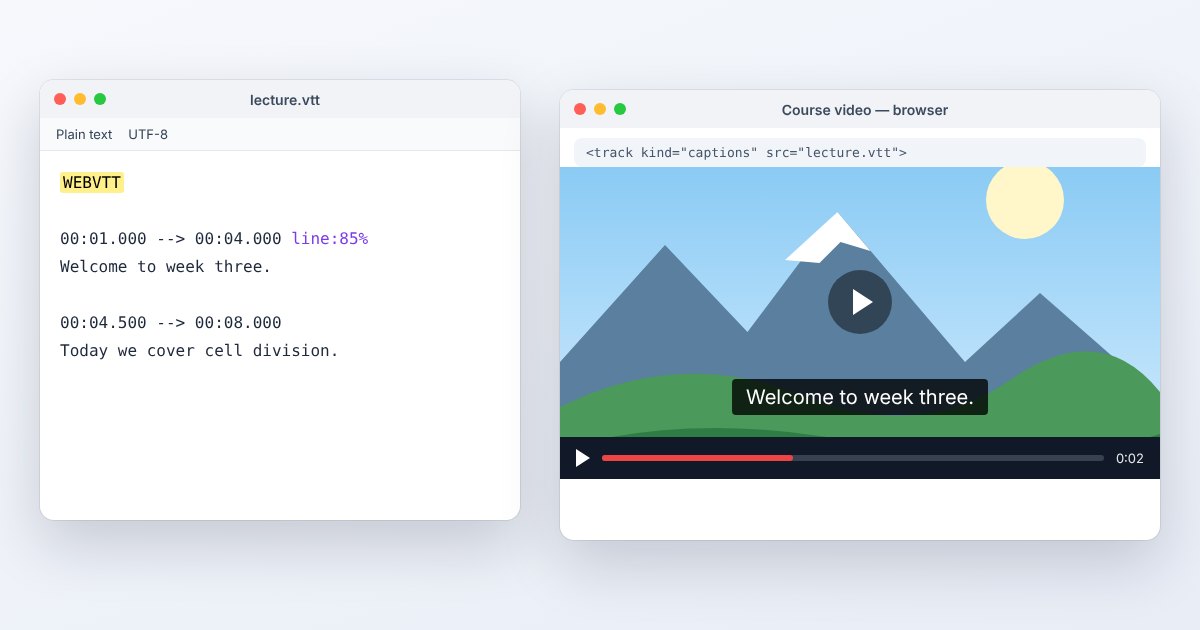
A WebVTT file begins with the WEBVTT signature and uses UTF-8 text. Cue times use a period before milliseconds, unlike the usual SRT comma convention. WebVTT also defines cue placement and related features. A file that looks like a transcript can therefore contain timing, identifiers and settings that should be retained when the goal is synchronized captions rather than plain reading.
How to open .vtt files
Windows
Open the file in Notepad or another plain-text editor to inspect its header and cues. For a playback test, use the website or media application that loads the track with its matching video. Double-clicking the VTT alone may simply open a text viewer.
Mac
Use TextEdit in plain-text mode or a code editor for inspection. Avoid saving rich text back over the VTT. To verify timing and placement, load the published video page in Safari rather than judging only the raw timestamp lines.
iPhone
Safari can display captions supplied by a website's video track. Open the video page and enable its captions control. A separately downloaded VTT does not automatically attach itself to a movie in Photos; use a compatible player or the site's own caption workflow.
Android
Chrome can render WebVTT tracks attached to HTML video. Select the intended caption language in the player. If working with a saved file outside a webpage, use a caption-capable application or convert to the subtitle format that application documents.
Browser
A website attaches the VTT using an HTML track element whose src points to the file, with an appropriate kind and language. Serve the file as text/vtt and test through a web server. Merely opening the VTT URL displays text, not subtitles over a separate video.
When to convert it and what changes
Convert VTT to SRT when an editor or player asks for SubRip. Basic text and cue times can carry over, while WebVTT positioning, regions, styling and non-caption metadata may have no equivalent in the target workflow. Keep the VTT original and compare the converted captions at several moments in the actual video.
Export plain text only when you want a reading transcript. Removing timestamps is useful for reading but discards synchronization. Conversely, burning captions into video fixes their appearance into pixels and removes viewer control over language or visibility. A format conversion does not repair inaccurate transcription or align a track created for a differently edited recording.
Three common problems and fixes
A renamed SRT produces no captions
Check for the WEBVTT header and correct timestamp punctuation. Use a proper conversion rather than renaming .srt to .vtt. Ensure blank lines separate cue blocks and each end time is later than its corresponding start time.
The video plays but its web captions do not load
Inspect the track URL, server response and browser network panel. A cross-origin track needs the appropriate media crossorigin setting and server permission. A missing file or access failure is a delivery problem, not proof that every cue is malformed.
Captions appear in the wrong position after conversion
The receiving format or player may ignore WebVTT cue settings or CSS styling. Test the target's supported placement options and revise that delivery copy. Preserve the original track if the speaker positions or on-screen labels need later adjustment.
.vtt and related formats
| Format | Useful for | Main tradeoff |
|---|---|---|
| VTT | Browser captions, chapters and timed metadata | Player styling support still varies |
| SRT | Simple captions for many editors | Less expressive placement information |
| TXT | A readable untimed transcript | No cue timing or playback association |
Frequently asked questions
What should the first line of a VTT contain?
The required signature is WEBVTT, optionally following a UTF-8 byte-order mark. Caption cues follow the header and separating blank lines. Saving as rich text introduces unrelated markup and breaks this structure.
Can VTT store more than subtitles?
Yes. The HTML track kind can indicate captions, descriptions, chapters or metadata. A metadata track is not intended to appear as ordinary subtitle text, so choose the kind that matches its purpose.
Why does VTT use dots where SRT uses commas?
The formats have different timestamp grammars. A converter should rewrite the syntax while keeping the time values, rather than doing an indiscriminate replacement throughout the caption text.
Does VTT to SRT change the spoken language?
No. Changing the file format is not translation. The output should retain the source words and timing unless you deliberately edit them; choose a separate translation workflow for another language.