Archives
What is a .tar.gz file?
Gzip-compressed tar archive
A two-layer archive often used to distribute source code and backups.
Also seen as .tgz
Official sources checked
What it is and where it appears
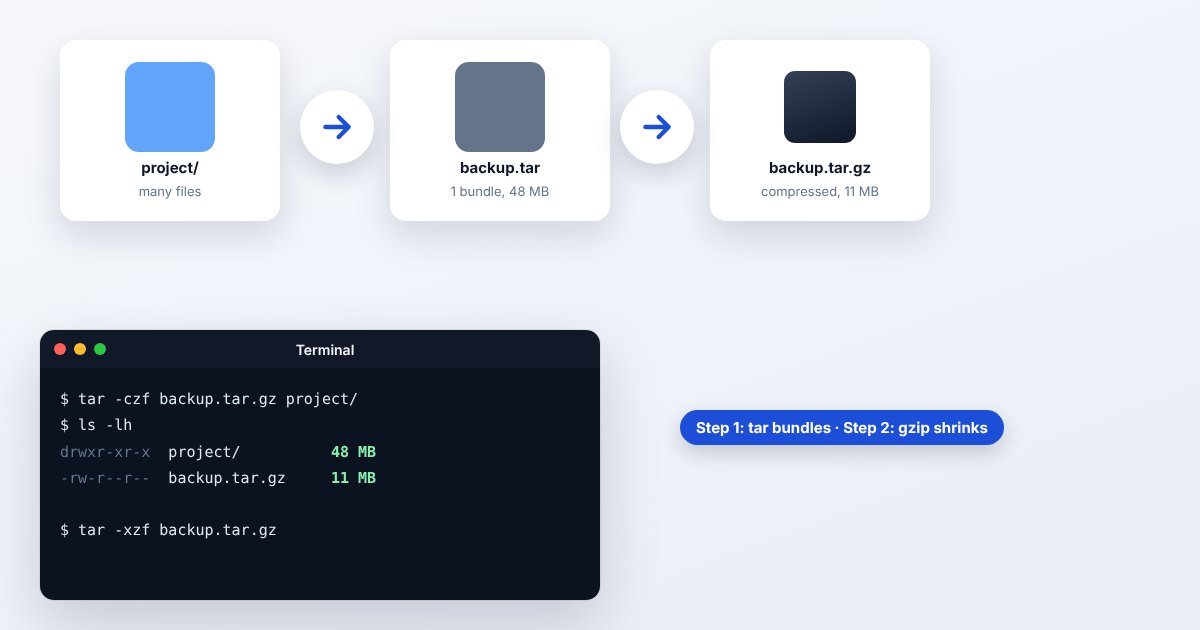
A .tar.gz is a TAR archive compressed with gzip. TAR collects filenames, directory structure and file contents into one stream; gzip then compresses that stream. The shorter .tgz extension usually describes the same arrangement. This two-stage design explains why an extractor sometimes produces a .tar before it produces the actual files you wanted.
You encounter tarballs in source-code releases, server backups and Linux software distributions. Unlike an installer, a tarball does not prescribe what to do with the extracted contents. A source release may require build instructions, whereas a backup may contain ordinary documents. TAR can carry filesystem information such as permissions and links, which makes the destination filesystem important when restoring it.
How to open .tar.gz files
Windows
Current Windows includes tar as a command-line tool. In Terminal or Command Prompt, use tar -tzf archive.tar.gz to inspect filenames, then tar -xzf archive.tar.gz to extract into the current directory. Create an empty destination first so files do not mingle with existing work.
Mac
Use Terminal's tar command with the same list and extract options. The -t option lists, -x extracts, -z selects gzip handling and -f introduces the filename. Quote a filename containing spaces, such as tar -xzf "source release.tar.gz".
iPhone
For a small tarball, choose UtilityNest's Extract TAR.GZ tool in Safari and select it from Files. If you need a faithful restoration of Unix permissions or links, transfer the archive to a suitable desktop or server instead of treating the phone as a backup restore target.
Android
Files by Google's extraction instructions cover ZIP, not TAR.GZ. Open the browser tool in Chrome for ordinary document contents. Large server backups should be extracted on the system where their permissions and directory structure can be checked.
Browser
Use the Extract a TAR.GZ archive link and inspect the contents after processing. If another extraction workflow gives you a .tar, open that TAR as the next layer; do not assume the intermediate file means your documents have vanished.
When to convert it and what changes
Repackage as ZIP for recipients who only need ordinary files and folders. Extract the tarball, inspect its contents, then create the new ZIP. Do not rename .tar.gz to .zip: a ZIP reader expects a different structure. For a Unix backup, keep the tarball because cross-platform repackaging may not preserve links, owners or permission semantics.
Converting the archive wrapper is independent of media quality. A photo inside remains the same photo if copied unchanged. Gzip is lossless, but extracting to an unsuitable filesystem can still change how names or special entries behave. List the archive before extracting an unfamiliar backup, and restore into a separate directory before moving files into their final locations.
Three common problems and fixes
GNU tar: “Archive is compressed. Use -z option”
This can occur when reading compressed input through a pipe. Supply the requested gzip option, for example tar -tzf archive.tar.gz for listing a local file. Match the command to the actual compression layer.
GNU tar: “Unexpected EOF in archive”
The input ended before tar expected. Obtain a complete replacement download and verify any checksum published by its maker. Continuing with a partial extraction can leave apparently normal filenames with incomplete contents.
gzip: “not in gzip format”
The downloaded bytes may already be decompressed or may not be the requested archive. Inspect the actual file type. If it is a plain TAR, list it with tar -tf; if it is a web error page, download the original archive again.
.tar.gz and related formats
| Format | Useful for | Main tradeoff |
|---|---|---|
| TAR.GZ | Compressed Unix folder bundles | Permissions need compatible restoration |
| TAR | Uncompressed archive stream | Larger when data compresses well |
| ZIP | Common desktop folder exchange | Different metadata and packaging rules |
Frequently asked questions
Are TGZ and TAR.GZ different?
They commonly name the same gzip-compressed TAR structure. An application may recognize one extension more readily, but the two labels do not imply different compression quality.
Is a GZ always an archive of many files?
No. Gzip compresses a stream and can wrap a single file. TAR supplies the folder-and-file packaging in TAR.GZ; a .csv.gz can simply be one compressed CSV.
Can I add files directly to a compressed tarball?
GNU tar does not allow its normal append, update or delete operations on compressed archives. Extract or otherwise rebuild the archive with the desired contents instead.
Will extracting a tarball run its software?
The extraction command writes its entries. Compiling or running a program inside is a separate action. Read the project's own instructions before executing anything from a source release.