Preview of the US Letter, landscape (2 pages) file
Measuring
Printable Ruler
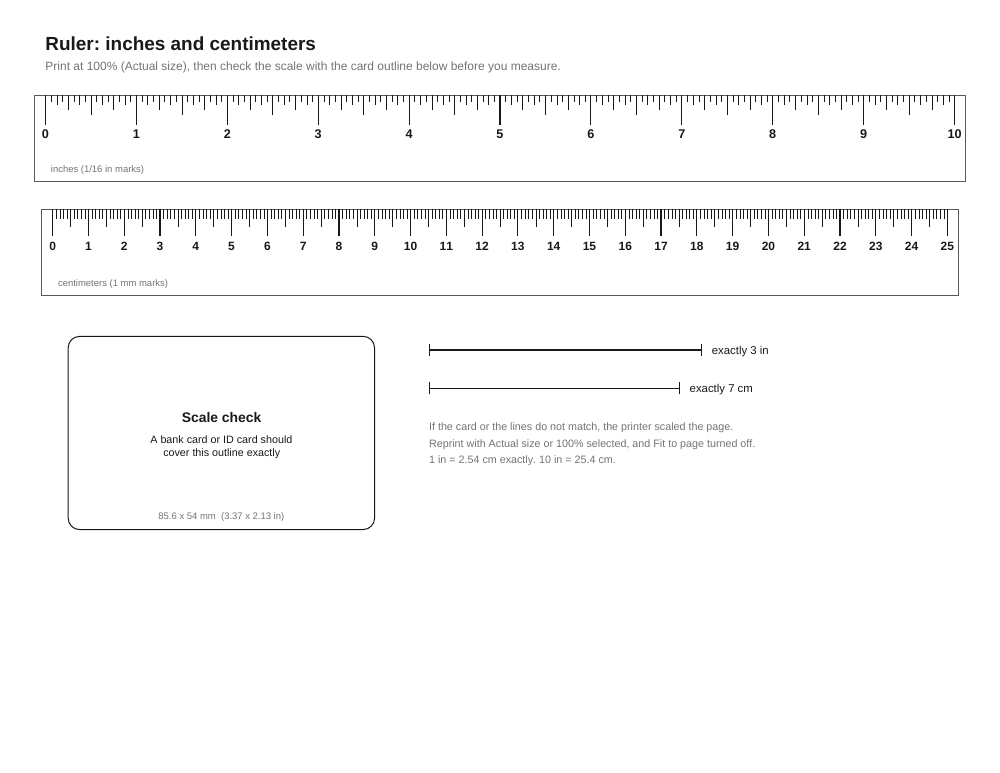
A 10 inch and a 25 cm ruler with a card-size scale check, plus four cut-out 6 in / 15 cm rulers.
- Price
- Free
- Format
- Size
- 2 pages, landscape
Download
Free for home, classroom and office use. No sign-up.
About this printable
A printed ruler is only useful if it prints at exactly the right size, and most printers quietly shrink a page by a few percent unless you tell them not to. So this printable comes with a way to check itself. Page 1 has a 10 inch ruler marked to 1/16 inch, a 25 centimeter ruler marked to the millimeter, and an outline the size of a bank card. If a bank card or a driver's license covers the outline exactly, the page printed at 100% and the rulers are accurate. Two short reference lines, exactly 3 inches and exactly 7 cm, give a second check.
Page 2 has four cut-out rulers, each 6 inches along one edge and 15 cm along the other, inside dashed cutting lines. They are handy for a pencil case, a sewing kit or a desk drawer, and four on a sheet means a set for a class table or a family.
We checked the files after generating them by rendering page 1 at 300 DPI and measuring the marks in pixels. The 0 and 10 inch marks are exactly 3,000 pixels apart (10.00 in), the 0 and 25 cm marks come out at 25.00 cm, every inch step is 300 pixels, and the card outline measures 85.60 mm across. Both the US Letter and A4 files use the same ruler lengths; only the paper around them differs. Nothing else is printed on the sheets: no logo, no website address.
How to check the scale before you measure
- Print page 1 with the scale set to 100% or Actual size. Turn off Fit to page, Shrink oversized pages and any borderless option.
- Lay a bank card, ID card or driver's license on the outline. Line up one corner first, then look at the opposite corner. It should sit right on the line.
- If the card is bigger than the outline, the printer shrank the page. A card that overhangs by about 2 mm on the long side means roughly 97% scaling, which is the usual Fit to page result.
- As a second check, measure the 3 inch line or the 7 cm line with any ruler or tape measure you trust.
- Once the scale is right, print page 2 with the same settings if you want the cut-out rulers.
Why printed rulers come out wrong
Almost every printer has a strip of a few millimeters along each edge where it cannot put ink, so print dialogs offer to scale the page down so nothing gets cut off. In many PDF viewers that option is on by default, often labelled Fit, Fit to printable area or Shrink oversized pages. On a ruler, a 3% shrink turns a 10 inch line into about 9.7 inches, and that error is easy to miss until a measurement does not add up.
The second cause is paper size. Printing the A4 file on US Letter paper, or the other way round, makes many printers scale or shift the page to fit. Pick the file that matches the paper in your tray. The third cause is printing from a phone photo or screenshot of a ruler. A picture has no physical size, so it will print at whatever size the app chooses. Always print from the PDF.
Reading the inch and centimeter marks
On the inch ruler the longest marks are whole inches, the next longest are half inches, then quarter inches, then eighths, and the shortest marks are sixteenths. To read a length, count whole inches first, then count the small marks past the last whole number: 3 inches and 5 small marks is 3 5/16 inches.
On the centimeter ruler each long numbered mark is one centimeter, the medium mark halfway between is 5 millimeters, and the short marks are single millimeters. A pencil that reaches 2 marks past the 14 is 14.2 cm, or 142 mm. To convert, one inch is exactly 2.54 cm, so the 10 inch ruler covers 25.4 cm.
Good uses for a paper ruler
A printed ruler is accurate enough for most everyday jobs once its scale is checked: measuring a ring size with a strip of paper, checking whether a parcel or a photo frame fits, sizing a shoe insole, marking out a craft project, or measuring a child's drawing for a frame. Teachers use the cut-out rulers when a class set goes missing, and they are useful for checking that a document printed at the right size, for example a form that has to be submitted at actual size.
Paper stretches a little with humidity and can be cut slightly off the line, so for work that needs better than about half a millimeter, such as engineering drawings or woodworking joints, use a steel ruler. For the same reason, measure from the 0 mark rather than from the end of a cut strip.
Making the cut-out rulers last
Plain copy paper bends and tears, so for rulers that will be handled every day, glue page 2 onto thin card stock or a cereal box panel before cutting, or print it straight onto card stock if your printer takes it. Cut along the outside of the dashed lines with scissors or a craft knife and a straight edge. Clear packing tape or a laminating pouch on both sides keeps the marks from rubbing off. Check one finished strip against the card outline on page 1, since glue and lamination can shift the paper slightly.
How to print it
- 1Open the PDF in a PDF viewer, not as an image, and choose Print.
- 2Set Scale to 100% or Actual size, and turn off Fit to page or Shrink oversized pages.
- 3Choose the file that matches your paper: US Letter in North America, A4 almost everywhere else.
- 4Print page 1 first and check it with a bank card before printing more copies.
- 5Use landscape orientation if your print dialog does not pick it automatically.
- 6For sturdier rulers, print page 2 on card stock or glue it to thin card before cutting.
Questions
Is this printable ruler actual size?
Yes, when it is printed at 100% scale. The marks are placed at exact inch and millimeter spacing in the PDF; we measured 10.00 inches and 25.00 cm on a 300 DPI render. Use the card outline to confirm your printer did not scale it.
Can I use a credit card to check the size?
Yes. Bank cards, most driver's licenses and many ID cards share the ID-1 size, 85.60 x 53.98 mm (about 3.37 x 2.13 inches). If your card matches the outline exactly, the rulers printed at the right size.
Why is my printed ruler a little short?
The print dialog scaled the page, usually with Fit to page or Shrink oversized pages turned on. Reprint with Actual size or 100% selected. Printing the A4 file on Letter paper, or the reverse, can also make the printer scale it.
Can I measure on my screen instead of printing?
Not reliably. Screens show a PDF at different sizes depending on pixel density and zoom, so an on-screen ruler is rarely life size. Print it and check it with the card outline.
Which file should I download, Letter or A4?
The one that matches the paper in your printer. The rulers are the same length in both files; the A4 sheet is a little wider and shorter in landscape.