How AI Image Generators Hide Tags in Your Pictures
By the UtilityNest team · · 6 min read
Most AI image generators now mark what they make, but you cannot see the mark by looking at the picture. It sits in one of three places: a signed record inside the file (C2PA Content Credentials), a plain text field in the file's metadata, or an invisible watermark woven into the pixels themselves. Which of the three you get depends on the tool, and only the first two can be read by an ordinary metadata reader. This guide goes tool by tool through what each one leaves behind, how each method works, and what can make a tag disappear.
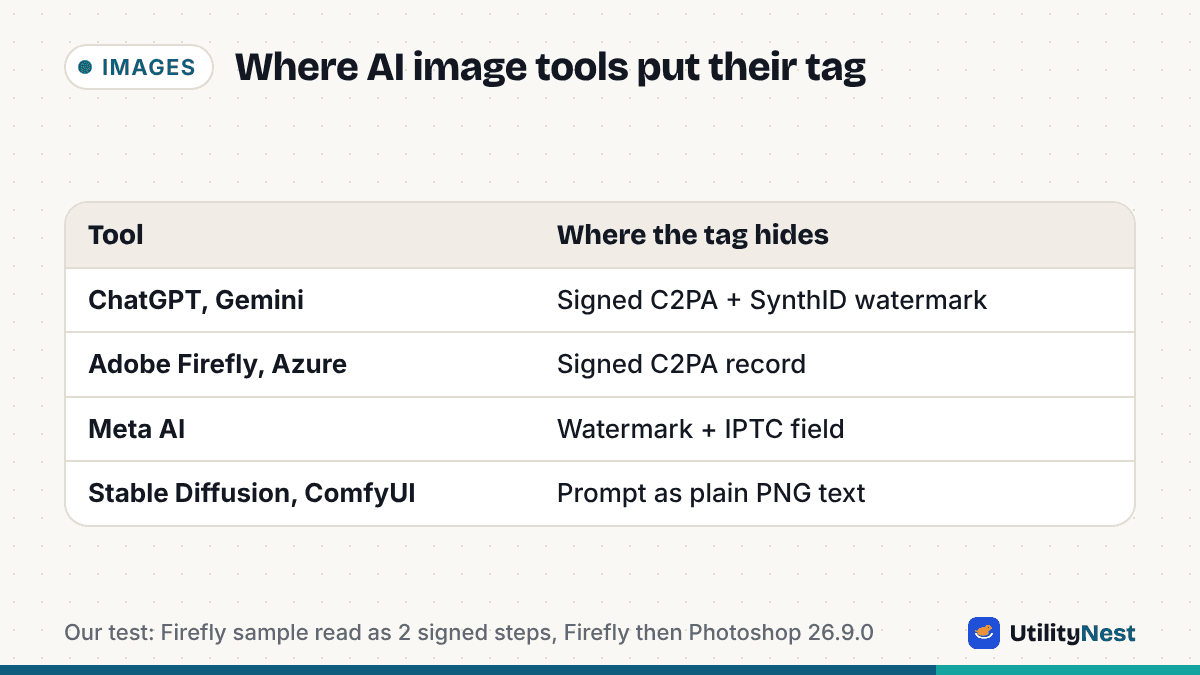
| Tool | Signed record (C2PA) | Invisible watermark | Plain metadata |
|---|---|---|---|
| ChatGPT and the OpenAI API | Yes | Yes (SynthID) | Inside the C2PA record |
| Google Gemini (Nano Banana Pro) | Yes | Yes (SynthID) | Inside the C2PA record |
| Adobe Firefly | Yes | Adobe describes watermarking as part of its durable credentials | Inside the C2PA record |
| Azure OpenAI (Microsoft) | Yes | Not stated in the docs we read | "AI Generated Image" in the record |
| Meta AI | Not stated | Yes | Yes (IPTC), plus a visible label |
| Stable Diffusion WebUI (AUTOMATIC1111) | No | No | Prompt and settings as text |
| ComfyUI | No | No | Prompt and full workflow as text |
Vendor documentation checked on October 30, 2026. Each row is linked to its source in the sections below and at the end.
The three ways a tag is stored
C2PA Content Credentials are a signed history attached to the file. The C2PA standard packs a manifest into a container format called JUMBF, which goes into APP11 segments in a JPEG and into a chunk named caBX in a PNG. The manifest lists actions such as "created" or "edited", and for AI output it carries a field called digitalSourceType. The value trainedAlgorithmicMedia comes from the IPTC vocabulary, where it means "Created using Generative AI", while compositeWithTrainedAlgorithmicMedia means a picture was edited with generative AI. The whole record is signed with an X.509 certificate belonging to the company that produced the file, and it includes a hash of the image data, so if the pixels change after signing, the signature no longer matches. That is what makes C2PA more than a label: it tells you who signed it and whether the picture has been altered since.
Plain metadata is ordinary text in the file: an XMP or IPTC field, an EXIF tag, or a PNG text chunk. Nothing is signed, so anyone can write or edit it. It is still useful, because many tools write it automatically and few people think to look.
Invisible watermarks work differently. Google's SynthID, for example, changes the pixel values in a pattern people cannot see but a detector trained for it can find. Because the mark lives in the image rather than next to it, it survives things that wipe metadata, and Google describes it as built to withstand common changes. The catch is that only the vendor's detector can read it. No general metadata tool, ours included, can confirm or rule out a SynthID watermark.
ChatGPT and the OpenAI API
OpenAI's help page on provenance says images generated with ChatGPT, Codex or the OpenAI API carry both signals: C2PA Content Credentials and a SynthID watermark. The same page lists some API models as exceptions, so an image from an app built on the API may not carry both. OpenAI also states that its provenance data does not include information about the user, the organization or the prompt. The credentials, OpenAI notes, can be lost through everyday actions such as taking a screenshot, while the watermark is meant to hold up against common changes but can weaken with heavy cropping or compression. OpenAI runs a verification page at openai.com/verify for checking its images.
Google Gemini
Google has watermarked images from its generators with SynthID since the system was introduced, and in May 2026 the company said more than 100 billion images had been watermarked. Since the launch of Nano Banana Pro in November 2025, Gemini images also carry C2PA metadata, and you can upload a picture to the Gemini app and ask whether Google AI made it. Google's SynthID Detector also checks content from partners that use SynthID, which now include OpenAI. Google has added Content Credentials to the Pixel 10 camera as well, which means some real photos carry a signed record too; a C2PA record by itself does not mean AI was involved.
Adobe Firefly
Adobe attaches Content Credentials to Firefly output and says on its Firefly help page that this applies to assets where 100% of the pixels are generated by Firefly. In 2024 Adobe described "durable" credentials that combine signed metadata with digital fingerprinting and invisible watermarking, so the record can be recovered when metadata is lost. When a Firefly image is later edited in Photoshop, the edit is added as another signed step, which is exactly what we saw in our test below.
Microsoft
Microsoft's Azure OpenAI documentation says images from its DALL-E and GPT-image models include Content Credentials, with a description of "AI Generated Image" and a software agent named "Azure OpenAI DALL-E" or "Azure OpenAI ImageGen". The Microsoft 365 Copilot FAQ says images created there use C2PA too. We did not find a current official page for Bing Image Creator or Designer, so we do not list them separately.
Meta AI
Meta says images made with its own Meta AI feature get a visible "Imagined with AI" label plus invisible watermarks and IPTC metadata embedded in the file. Meta also reads C2PA and IPTC signals from other companies' tools (it names Google, OpenAI, Microsoft, Adobe, Midjourney and Shutterstock) to label AI images people upload to Facebook, Instagram and Threads. Meta itself acknowledges that these markers can be removed.
Stable Diffusion and ComfyUI
Open-source tools that run on your own computer do not sign anything, but they are often the most talkative. The AUTOMATIC1111 Stable Diffusion WebUI saves the full generation settings (prompt, negative prompt, sampler, seed, model) in a PNG text chunk called parameters, and in the EXIF UserComment field when saving JPEG or WebP. ComfyUI saves two PNG text chunks, prompt and workflow, which hold the entire node graph that made the picture. Because this is plain text, anyone with a metadata viewer can read the exact prompt, and anyone can also edit or fake it.
Midjourney is a common question. We could not find official documentation of what Midjourney writes into its files, so we do not describe specific fields here.
Why tags go missing
The signed record and the text fields are part of the file, not the picture. Every vendor above says some version of the same thing: a screenshot, a re-save in an app that does not keep metadata, or an upload to a site that strips it can leave a clean-looking file. Many social sites remove metadata on upload for privacy, although TikTok and LinkedIn have both said they read Content Credentials and label content that carries them. This is why vendors pair the record with a watermark, and why a missing tag is never proof that a person made the picture.
What we saw when we tested it
We built the AI Image Checker to read the first two kinds of tag in your browser. On an Adobe Firefly sample file from the open-source C2PA library's test set, it found Content Credentials signed by Adobe Inc. with two signed steps, a Firefly text-to-image generation followed by an edit in Photoshop 26.9.0, and the signature still matched the pixels. On PNG files we generated with the same text fields AUTOMATIC1111 and ComfyUI write, it showed the prompt and model, and on a plain camera JPEG it found no AI tags. All eight test files took about 1.2 seconds, and none of the image data left the browser.
If the checker finds nothing and you still need an answer, try the vendor's own detector: the Gemini app for Google's SynthID and openai.com/verify for OpenAI images. To see every metadata field in a file, not only the AI ones, open it in the EXIF Viewer.
Sources
- OpenAI: Provenance signals in OpenAI-generated content
- Google DeepMind: SynthID
- Google: AI image verification in the Gemini app (November 2025)
- Google: Making it easier to understand how content was created and edited (May 2026)
- Adobe: Content Credentials in Firefly
- Adobe: Content Authenticity announcement (2024)
- Microsoft: Content Credentials in Azure OpenAI
- Microsoft 365 Copilot: Create FAQ
- Meta: Labeling AI-generated images
- AUTOMATIC1111 Stable Diffusion WebUI: Features
- ComfyUI: Workflow metadata
- C2PA Technical Specification 2.2
- IPTC: Digital Source Type vocabulary
- TikTok: AI transparency and Content Credentials
- LinkedIn: C2PA rollout