Nested JSON to CSV: Fix Arrays, Missing Keys, Odd Columns
By the UtilityNest team · · 6 min read
Flat JSON turns into a CSV without any fuss. Real JSON from an API or an export rarely is flat: a customer sits inside an order, the order holds a list of items, and some records have fields that others don't. A CSV has one value per cell, so something has to give. This guide uses one small sample, three orders with a nested customer, a list of tags and a list of items, to show what each setting in JSON to CSV produces and how to fix the usual complaints.
The sample, in short: order A-1001 has a customer named 김민지 in Seoul, two tags and two items; A-1002 has a customer in Busan with no zip code, no tags, one item and a coupon; A-1003 has a customer whose address is null, one tag and no items. The whole list is wrapped in an object with total and page fields, the way many APIs return it.
The list of items ends up as JSON text in one cell
This is the most common surprise. With the default setting, Join values in one cell, an array of simple values becomes text joined with semicolons (the tags came out as "gift; rush"), but an array of objects is kept as JSON text. Our items column contained [{"sku":"PEN-1","qty":2,"price":3.5},{"sku":"INK-7","qty":1,"price":12}] in a single cell, which is correct but not usable in a spreadsheet.
The cause is that there is no single right way to flatten a list of objects. Either each item becomes extra columns or each item becomes its own row. The fix is to pick one under Arrays inside records, as the next two sections show.
You want one column per item
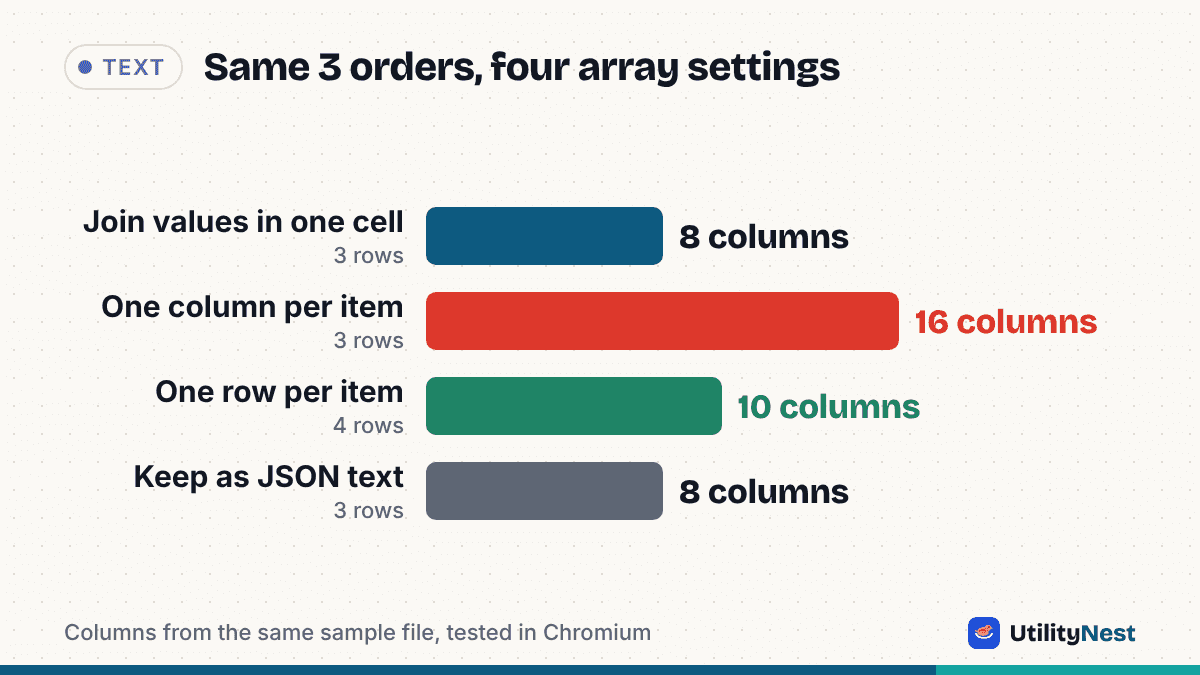
Choose One column per item and nested lists turn into numbered columns such as items.0.sku, items.0.qty, items.1.sku and so on. In our test the table grew from 8 columns to 16, still with 3 rows, and the first order filled both item slots while the second order left the second slot blank.
This suits lists that are short and a known length, like a "primary and backup phone number". It scales badly otherwise: the column count follows your longest list, so one order with 40 items gives you 40 sets of columns for every row.
You want one row per item
For orders, invoices and anything with line items, rows are usually what you want. Choose One row per item, then pick the array in the Array to split into rows field. Pick items, and the order fields repeat on every line. In our test the 3 orders became 4 rows: A-1001 appeared twice with the same customer and tags and a different item each time (PEN-1 then INK-7), A-1002 once, and A-1003 once.
Two details matter. First, an order whose list is empty is not dropped. A-1003 kept its row with blank item columns, so a count of rows still covers every order. Second, our tool preselected tags in that dropdown, not items, because that was the first array in its list. If you leave it alone you get one row per tag instead, so always check which array is selected. The item fields were flattened into items.sku, items.qty and items.price.
| Setting for arrays | Columns | Rows | Good for |
|---|---|---|---|
| Join values in one cell | 8 | 3 | Lists of plain values such as tags |
| One column per item | 16 | 3 | Short lists of fixed length |
| One row per item (items) | 10 | 4 | Line items, one record per row |
| Keep as JSON text | 8 | 3 | Keeping the exact structure for later code |
These counts come from our sample, so yours will differ, but the pattern holds: the settings trade columns against rows.
The converter used the wrong list as the rows
A JSON document often wraps its records, as ours did with an outer object holding data, total and page. If more than one list could be the records, the tool shows a Rows come from selector. In our test it chose data (3 records) automatically and ignored the paging fields. If the tool offers several choices and the preview shows the wrong thing, open the selector and pick the array that holds your real records. The row count next to the preview tells you quickly whether you are on the right one: ours said 3 rows for 3 orders.
A column appears that is always empty
Look at the last column in the output: customer.address. It was blank for every order. The cause is A-1003, whose address is null in the JSON. Because that record has no city or zip to expand, the converter writes the null under the parent's name, so the table gets one extra column. The same thing showed up in all four array settings. It is harmless, and the fix is to untick it in the Columns list above the preview. The Columns list also lets you drop fields you don't need, which is the quickest way to shrink a wide table.
Some records have fields others don't
Only A-1002 had a coupon. The converter handles this by creating a coupon column and leaving it blank for the other two orders. In our output the columns follow the order in which a field first appears in the data, which is why coupon sits near the end. Nothing is lost, but if you see unexpected blanks, check whether a field was missing from those records in the original JSON rather than blaming the conversion.
Korean or accented names look garbled in Excel
The sample deliberately includes a Hangul name. CSV files have no way to declare their encoding, and Excel often misreads UTF-8 text unless the file starts with a byte order mark. The tool's Excel-friendly (UTF-8 BOM) switch is on by default, and the file we downloaded did start with the three BOM bytes (EF BB BF) before the text. If a spreadsheet still shows broken characters, try opening the file through the spreadsheet's import dialog and choose UTF-8, or use the Download Excel file option instead of CSV.
Numbers and codes change when you open the CSV
The zip code 04524 is written as 04524 in the CSV text. A spreadsheet that opens the file may still treat it as a number and drop the leading zero, which is the same for phone numbers, long order IDs and anything that looks numeric. If you only need the data for code or a database, this does not matter. If a person will read it in a spreadsheet, check those columns after opening.
Limits to know about
The tool shows a preview of the first rows and the beginning of the CSV text, but copy and download include everything. Invalid JSON is rejected with the line and column of the problem, so fix the syntax first. JSON Lines files, with one record per line, are read too. It does not rewrite your data, so values stay as they are in the source, and everything runs in your browser without uploading the file. For the other direction, CSV to JSON turns a flat table back into records.
Tested on November 3, 2026 with UtilityNest's JSON to CSV tool in Chromium, using the three-order sample described above.