US Passport Photo Size in Pixels and KB: Which Rule Applies?
By the UtilityNest team · · 7 min read
Search for the US passport photo size and you get three different answers: 2 x 2 inches, 600 x 600 pixels, and "under 240 KB". They are all real, and they belong to different situations. Mixing them up is how people end up with a photo that is the right size for a visa form and refused for a passport, or the other way around. This guide sorts out which rule applies to you, what the pixel numbers mean when you print, and how the UtilityNest Passport Photo Maker behaved when we tested it. Rules checked on November 5, 2026 on the State Department's own pages.
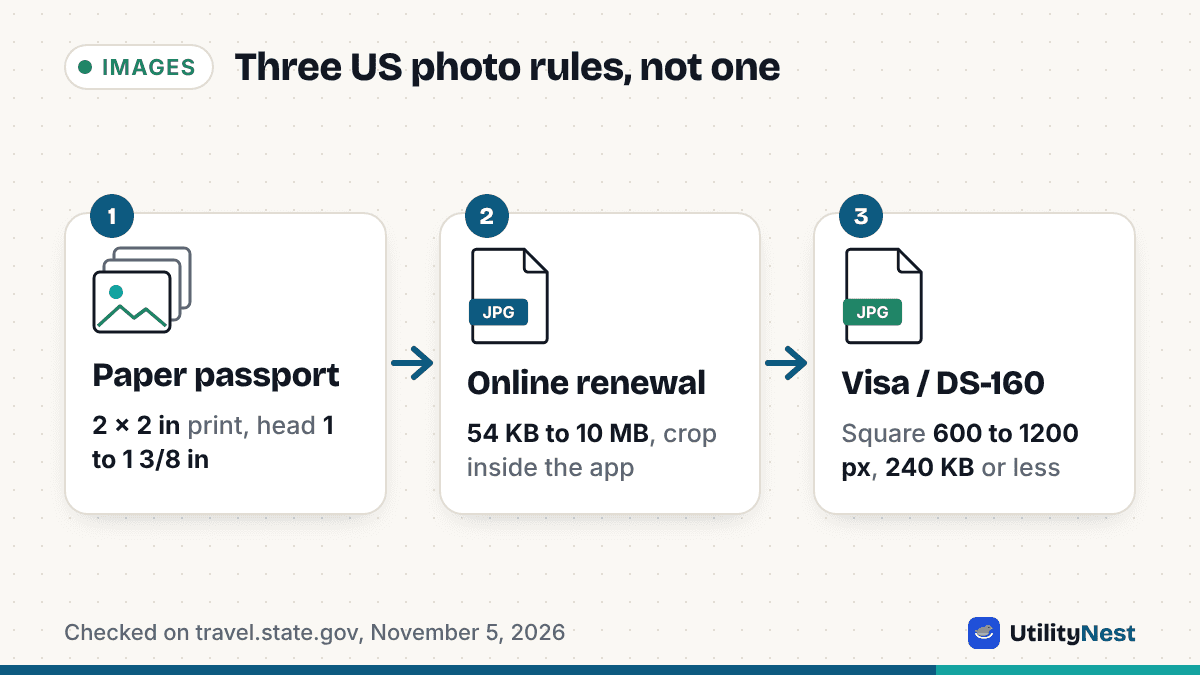
Which rule applies to you
| Your situation | Size rule | File rule |
|---|---|---|
| Paper passport application (printed photo) | 2 x 2 inches (51 x 51 mm), head 1 to 1 3/8 inches (25 to 35 mm) from chin to top of head | Printed on matte or glossy photo paper, no scans or photocopies |
| Online passport renewal (digital upload) | No pixel size stated; you crop in the application | JPG, JPEG, PNG, HEIC or HEIF, 54 KB to 10 MB |
| US visa or DS-160 (digital image) | Square, 600 x 600 to 1200 x 1200 pixels | 240 KB or less |
The one that surprises people is the middle row. The older advice of "600 x 600 pixels and 240 KB" comes from the digital image requirements for visa applications. The State Department's page for uploading a digital photo to renew a passport online, last updated May 4, 2026, lists a different set: a file between 54 KB and 10 MB in one of five formats, taken in the last 6 months, in color, and not a photo of a printed photo. It does not give a pixel size at all, and says you can reposition or crop the photo inside the application. So if you are renewing online, a 240 KB limit is not the rule you are working under.
What the pixel numbers mean for a printed photo
Pixels and inches are linked by print resolution. A 2 inch photo printed at 300 pixels per inch is 600 pixels wide, which is why 600 x 600 is the smallest visa size. The largest allowed size, 1200 x 1200, would be 600 pixels per inch at the same 2 inches. The DPI number stored in a JPEG is only a label. Upload portals check the pixel count, so changing the DPI tag in an editor does not turn a small image into a large one.
The same arithmetic tells you how big your head should be in a 600 pixel frame. One inch of head is 300 pixels and 1 3/8 inches is about 412 pixels, so chin to top of head should take up roughly half to 69 percent of the picture height. That is the check the guide lines in our tool draw for you: a red line for the top of the head and a green band for where the chin should land.
Where 54 KB comes from
The new minimum looks arbitrary until you do the math. A 600 x 600 image has 360,000 pixels, and an uncompressed color pixel takes 3 bytes, so the raw image is 1,080,000 bytes. Divide by 20 and you get 54,000 bytes. We cannot say that is the State Department's formula, but it matches a 20 to 1 compression ratio on the smallest allowed size, and a file well below that usually means the photo has lost detail. If a portal rejects a file as too small, it is often a sign that the image is very smooth or heavily compressed, not that it needs to be larger in pixels.
What we tested
We made two 3024 x 4032 test images, a person-shaped figure on a white wall, one perfectly smooth and one with camera-like noise added, and ran each through the Passport Photo Maker on the US passport preset in Chromium. These are generated images, not real faces, so treat the byte counts as a demonstration of the effect rather than a typical result.
| Test image | Single photo download | File size |
|---|---|---|
| Smooth, no noise | 600 x 600 px, 300 DPI | 22.1 KB |
| With camera-like noise | 600 x 600 px, 300 DPI | 56.6 KB |
Both came out at exactly 600 x 600 pixels and carry a 300 DPI tag. The noisy one clears the 54 KB minimum and sits well under 240 KB, so it fits both the online renewal rules and the visa rules. The smooth one is only 22 KB even after the tool raised the JPEG quality, because a flat image simply has little information to store. A real phone photo has skin texture, hair and fabric, which usually carries far more detail than our smooth image, but if you ever see a "file too small" message, this is the reason.
Testing also showed a gap that we fixed the same day. For the US presets the single photo and the upload file are the same size, so the tool offered only one download, and that one did not apply the quality boost that protects against over-compressed files. The boost now applies to it, which is what raised the smooth file from 12.3 KB to 22.1 KB and the noisy one from 34.2 KB to 56.6 KB. Neither the tool nor any other editor can add detail that is not in the photo, though, so the better fix for a rejected smooth file is a new photo in natural light.
For an online renewal, do not shrink the photo
Because the renewal page allows files up to 10 MB and does its own cropping, the safest file is the original photo from your phone, saved on the device you will renew from. The State Department also asks for an original, unedited photo without filters or digital changes, and warns that images sent by text message lose quality. Resizing or compressing a photo before upload gains you nothing there and risks falling under the 54 KB floor. The Passport Photo Maker is more useful when you need a print, a visa photo of exactly 600 x 600 pixels, or a sheet of copies.
Printing copies on a 4 x 6 sheet
The tool lays out printable sheets at 300 DPI. For the 2 x 2 inch photo it produced these layouts:
- 4 x 6 inch print: 2 photos on a 1200 x 1800 pixel file
- A4 paper: 15 photos
- US Letter paper: 15 photos
The count on 4 x 6 looks low because a 4 inch wide print fits exactly two 2 inch photos only with no margin at all, and photo labs can trim a little from the edges of a print. The tool leaves a small margin and gap so nothing gets clipped, which costs room for a second column. If you need more copies, use A4 or Letter and cut along the grey lines, printing at 100 percent or "actual size", never "fit to page". Photo labs can print the 4 x 6 file as a standard photo. Print on photo paper, and measure one printed photo with a ruler to confirm it is 2 inches square.
What the tool does not do
The Passport Photo Maker crops, sizes and adjusts brightness; it does not replace the background, remove shadows, fix expression or check that your pose is acceptable. The State Department says photos with a retouched background or outline are refused, and that every photo is checked for edits. Take the photo in even light in front of a plain white or off-white wall, remove glasses, keep your mouth closed or a natural expression without showing teeth, and use the tool only for the size and layout. Whether a photo is accepted is decided by the State Department, and we cannot promise it.
Quick answers
Do I need 600 x 600 pixels for a passport? Not for an online renewal. The renewal page gives no pixel size. 600 x 600 is the minimum for visa and DS-160 digital images.
Can I use a HEIC photo straight from my iPhone? For online renewal, yes: HEIC and HEIF are listed. For a visa form, the image must be square and 240 KB or less, and our tool saves JPEG files, so run the photo through it first.
Is 2 x 2 inches the same as 51 x 51 mm? Yes, the State Department lists both for the printed photo.
Sources, all checked on November 5, 2026: the State Department's pages for passport photo requirements, uploading a digital photo for online renewal and digital image requirements for visas. Tool results are from UtilityNest's Passport Photo Maker in Chromium on generated test images.